How notification-based spending tracking works (and what it misses)
What happens between tapping your card and seeing the purchase in a budget app that reads alerts: the steps, the filters, the gaps and the privacy trade-off.
Part of the series that starts with Budget apps that don't need your bank login (and how they work).
Try it for free on Google Play
Spendguin is our product, so we're a biased source. Spendguin is an Android budgeting app that shows what's left to spend today by reading purchase alerts from your bank and wallet apps. No bank login. Where the research is mixed, we say so, and no study has tested Spendguin itself. 🐧
The short version of the long version
Bank-linked budgeting apps get your transactions from the bank, through a data aggregator, a few times a day. Notification-based apps get them from your phone instead, from the alerts your bank and wallet apps already send. Our pillar guide, budget apps that don't need your bank login, compares the two with manual and file-import apps. This guide is about how the notification route works, step by step, and where it falls short.
From tap to number, step by step
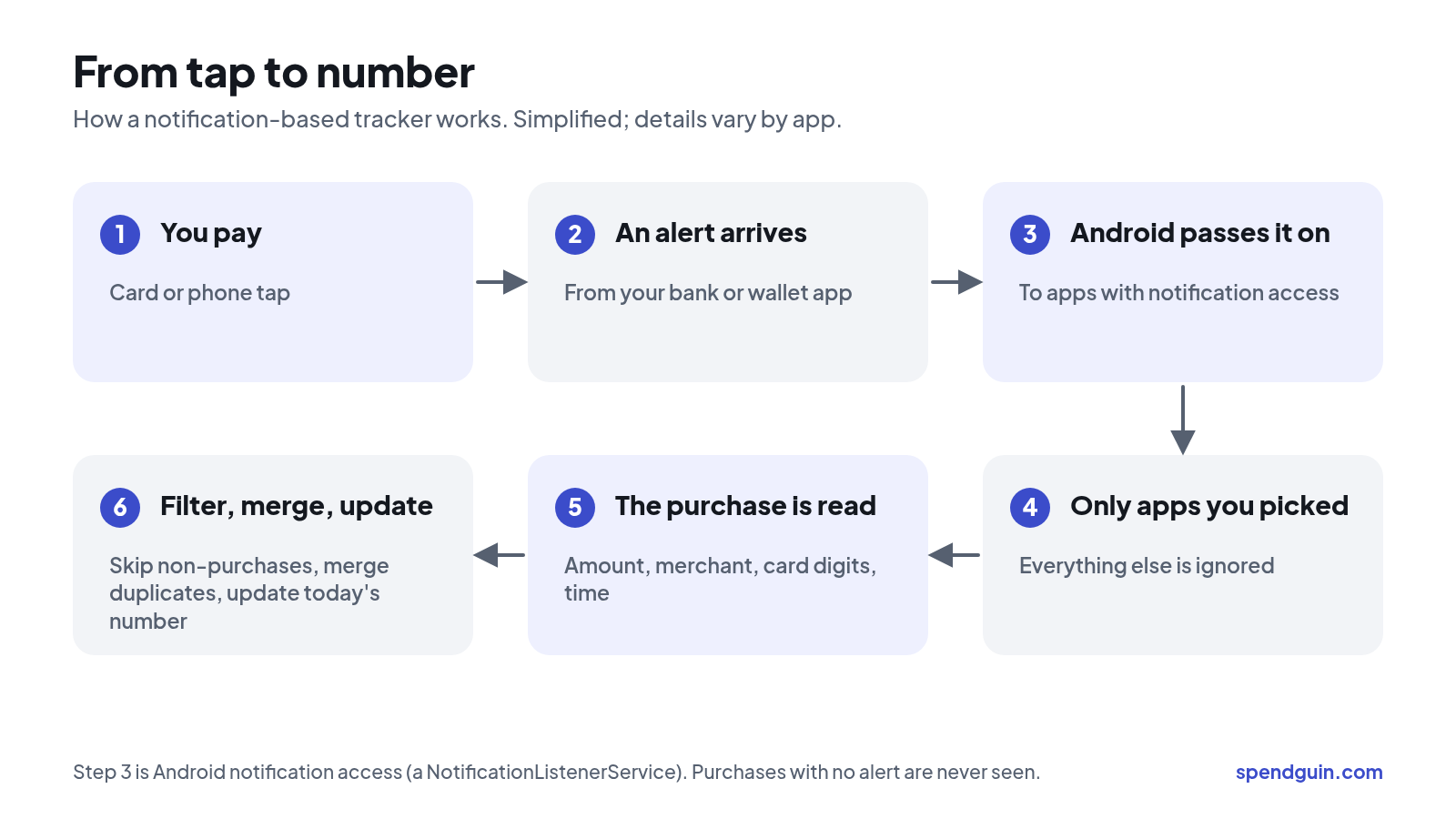 Figure 1. How a purchase alert becomes a tracked purchase. Simplified; details vary by app.
1. You pay, and your bank or wallet app sends an alert
Many bank and card apps can send a push notification for every purchase. Google Wallet and Samsung Wallet can send one when you tap to pay with your phone. Nothing here involves the budgeting app yet; it's the same alert you'd see on your lock screen.
2. Android hands the alert to apps with notification access
Android has a permission that lets an app you approve receive the notifications other apps post. Developers build it with a system service called a notification listener (Android Developers). You turn it on in Settings, under something like Notification read, reply & control, and Android shows a warning that the app can read all notifications (turn on notification access).
3. The tracker ignores everything except the apps you picked
Notification access covers every app, so a careful tracker narrows it down. Spendguin acts only on the bank and wallet apps you choose in setup or Settings, and ignores the rest: messages, email, games, everything else.
4. It reads the purchase out of the alert
Every bank words its alerts differently. The tracker looks for a dollar amount, a merchant name, the last digits of the card, and the time. "A purchase of $24.37 at a coffee shop was approved on your card ending in 1234" becomes four fields.
5. It filters out alerts that aren't purchases
Bank apps send lots of alerts that mention money but aren't spending. Spendguin skips or sets aside, for example:
- declined purchases;
- payments toward your credit card, statement notices and autopay reminders;
- transfers between your own accounts and deposits;
- money from or requests by other people in payment apps;
- verification codes and passcodes.
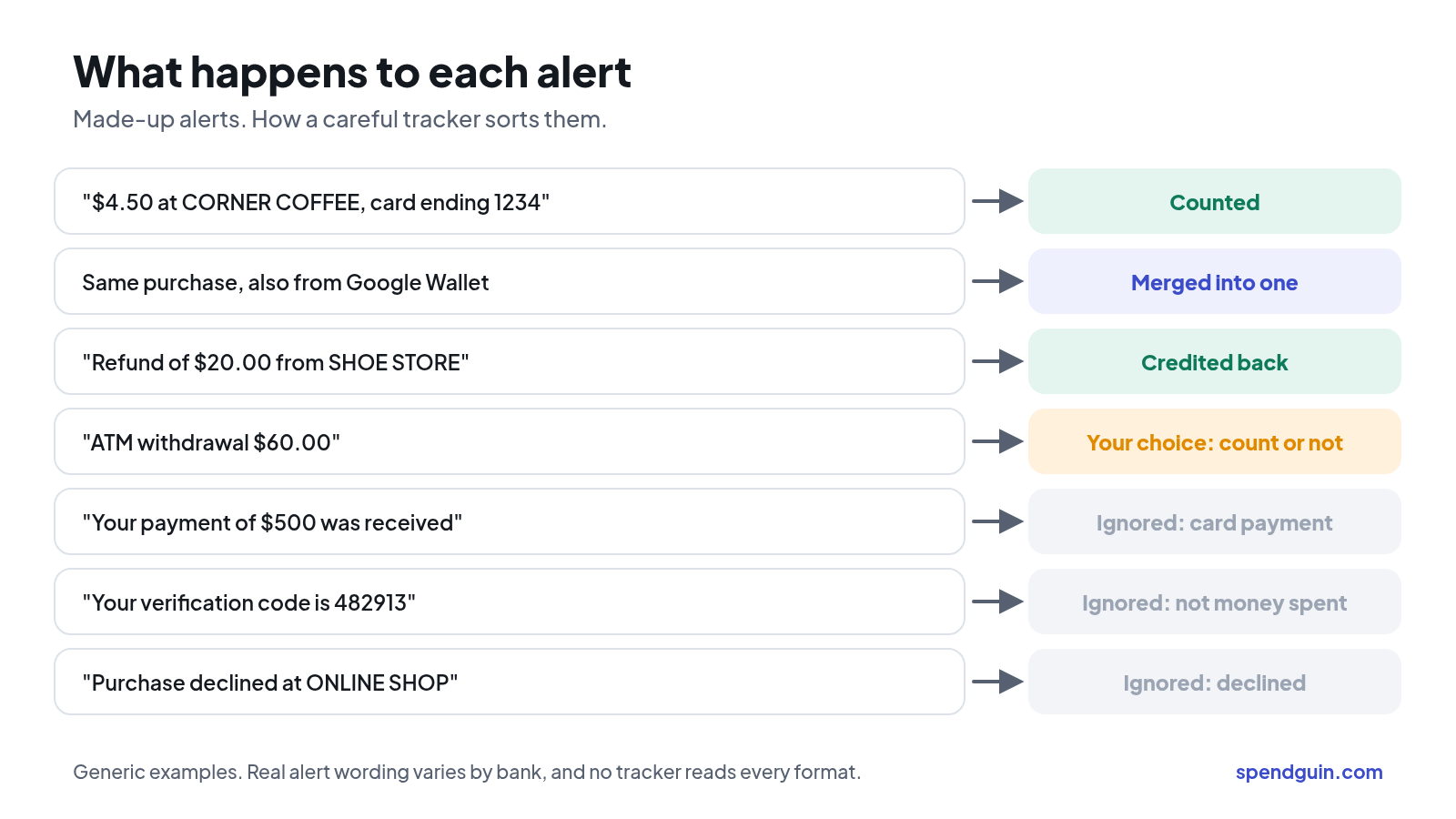 Figure 2. What happens to each alert. Made-up examples; real wording varies by bank.
Refunds are recognized and credited back instead of counted as new spending. Cash withdrawals can be marked "Don't count", and you can make that a rule for the card (withdrawals).
6. It merges duplicates and updates the number
One tap-to-pay purchase often produces two alerts: one from Google Wallet and one from your bank. Spendguin folds the second alert into the purchase it already saved, keeping the fuller merchant name. Then the purchase comes off what's left today, and the alert you get back says what's left.
What it sees and what it misses
| Purchase | Seen? | Why |
|---|---|---|
| Card purchase with the bank's purchase alerts on | Yes | The bank app sends an alert |
| Tap to pay with your phone through Google Wallet | Yes | Wallet sends an alert for phone taps |
| Online purchase | Only if your bank alerts on it | Google Wallet only alerts on phone taps (Google Wallet alerts) |
| Purchase under your bank's alert threshold | No | Many banks only alert above an amount you set |
| Alerts sent by text or email | No | Spendguin reads app notifications only |
| Alerts that go to another phone or tablet | No | The tracker has to be on the phone that gets the alert |
| Cash | No | There's no alert; add it by hand |
The most common gap is the bank side, not the tracker. If nothing shows up, check whether the bank's alert appeared on the phone at all (no purchases showing up).
How to set it up so it catches more
- Turn on purchase alerts in each bank or card app you spend from. Set the minimum amount to $0 or as low as it goes.
- Choose app notifications, not texts or email, for those alerts.
- Allow the bank app's notifications in Android, including any "transactions" category.
- Give the tracker notification access and pick your apps.
- Make a small test purchase and watch for both the bank's alert and the tracked purchase.
- Check your phone's battery settings. Some phones stop background apps to save power; the help center has steps if access keeps turning off.
How fast it is
About as fast as the alert. Purchase alerts usually arrive within moments of paying, and the tracker reads them as they arrive. For comparison, Plaid's developer documentation says it typically checks for new transactions one to four times a day, depending on the bank (Plaid docs). Speed matters if you want to check what's left before your next purchase; our real-time spending tracker guide covers why.
Where it gets things wrong
- Unfamiliar wording. A bank changes its alert text and the tracker doesn't recognize it. Spendguin learns each card's wording over the first few purchases, and asks "Is this a purchase?" when it isn't sure.
- Shortened merchant names. Alerts often cut names off or add processor prefixes. The tracker can clean some of that up, but not all.
- Other currencies and languages. Spendguin's parsing is tuned for English-language alerts with dollar amounts. Other alerts may be skipped or saved with an incomplete merchant.
- A card nobody added yet. A purchase on a new card waits on the phone until you decide whether to count that card.
You can edit any purchase, mark it not counted, or add one by hand.
What it can see, and what leaves the phone
Notification access is broad, so the privacy question is what the app does with it. Questions worth asking any notification-based tracker:
- Which apps' notifications does it read, and can I choose?
- Does it keep the full alert text, and where?
- What gets sent to its servers?
- Can I keep a card private?
For Spendguin: it reads only the apps you pick. The full alert text stays on your phone. The amount, merchant, last card digits and time of each purchase sync to your household so the daily number works across devices and with a partner (what stays on the phone vs syncs). A card marked Private never syncs its purchases. It never asks for a bank username or password (no bank login).
Who it suits
Notification tracking fits if you're on Android, pay mostly by card or phone, and want spending to show up without typing or linking a bank. It fits less well if you use a lot of cash, if your bank can't send app alerts, or if you want a full picture of every account, transfer and balance. For subscriptions specifically, see how to track subscriptions without linking your bank.
Where Spendguin fits, and where it doesn't
Spendguin is a notification-based tracker: it turns your purchase alerts into one daily number.
- You set one spending target for your pay period (monthly, twice a month, weekly, or every 2 weeks), and Spendguin turns it into a daily amount.
- It picks up purchases from your Google Wallet and bank-app notifications. There's nothing to type, and it never connects to your bank account (no bank login).
- Overspend today and it comes off the days after, within the same pay period. A new period starts fresh: leftover money doesn't roll into it.
- Free: the daily Today screen; alerts on every purchase, when you're getting close to today's amount and when you're over it; the "Recurring?" prompt; refund alerts; 30 days of history; and Together, partner sharing for two people.
- Pro ($4.99 a month or $39.99 a year in USD or CAD, after a 30-day free trial with no card needed, starting when the first purchase notification arrives): spreading a big purchase over several pay periods, a heads-up the day before a recurring charge, a nightly recap and a Monday week-ahead, a choice when a period ends over (spread the overspend across the new period or take it off day one), and full history. Pro features show as locked on Free.
What it doesn't do: it's Android only, it needs notification access, and it can only see what alerts show, so cash and anything without an alert has to be added by hand. It tracks spending you've already made. It doesn't move money or give financial advice. And it hasn't been tested in a controlled trial; we built it on ideas from behavior science, not proof that it changes behavior.
Sources
- Android Developers: NotificationListenerService API reference. Accessed .
- Plaid developer documentation: Transactions webhooks (update frequency). Vendor documentation, not independent testing. Accessed .
- Spendguin help center: Turn on notification access; What stays on the phone vs syncs; No purchases showing up. Accessed .
- Spendguin help center: Google Wallet purchase alerts. Accessed .
FAQ
How do budgeting apps track spending automatically?
Most link to your bank through a data aggregator and pull transactions a few times a day. Some Android apps instead read the purchase notifications your bank or wallet app already shows, so purchases appear about when the alert arrives, with no bank login.
Is it safe to give an app notification access?
It's a powerful permission: Android warns that the app can read all your notifications. Check which apps it says it reads, what it keeps and what it sends off the phone, in its privacy policy and the Play Store data-safety section. Spendguin only uses alerts from the apps you pick and keeps the alert text on your phone.
Does notification-based tracking work on iPhone?
Spendguin is Android only. The method depends on Android's notification access permission, which lets an app you approve read notifications from other apps.
Why didn't a purchase show up?
Usually because no alert reached the phone: purchase alerts are off in the bank app, the alert threshold is set above the purchase amount, alerts go by text or email, they go to another phone, or the bank app's notifications are turned off in Android. If the alert did arrive, the tracker may not have recognized its wording.
Can it read text-message or email alerts?
Spendguin can't. It reads app notifications only. Most banks can send the same purchase alerts as push notifications from their app.
Does it see my bank balance?
It sees whatever text the alert contains while it reads it. Spendguin keeps only the amount, merchant, last card digits and time of each purchase; the full alert text stays on your phone.
Spendguin shows what’s left to spend today by reading the purchase alerts you already get. No bank login.