Real-time spending tracker: what it is and whether it helps
What real time means for a spending tracker, how a notification-based one works, what it can miss, and what the evidence says about whether it helps.
Part of the series that starts with Why budgets fail: the feedback delay problem.
Try it for free on Google Play
Spendguin is our product, so we're a biased source. Spendguin is an Android budgeting app that shows what's left to spend today by reading purchase alerts from your bank and wallet apps. No bank login. Where the research is mixed, we say so, and no study has tested Spendguin itself. 🐧
This guide is the practical companion to why budgets fail: the feedback delay problem, which covers the research in depth.
What "real time" actually means
"Real time" is a spectrum, and the word hides a lot. What matters is how the tool finds out you spent money:
| How the tool gets your purchases | When the number can change | Effort for you | Main weak spot |
|---|---|---|---|
| You type each one in | As soon as you finish typing | High, every time | Easy to forget, easy to quit |
| A bank connection | When the bank or its data provider shares the transaction (this varies by bank and tool) | Low after setup | Needs a bank login, and timing is outside your control |
| Reading your phone's purchase alerts | When your bank or wallet app posts the alert | Low after setup | Only sees what alerts cover |
None of these is automatically best. The useful question is not "is it real time?" but "how soon after I spend does the number move, and how much do I have to do to make that happen?"
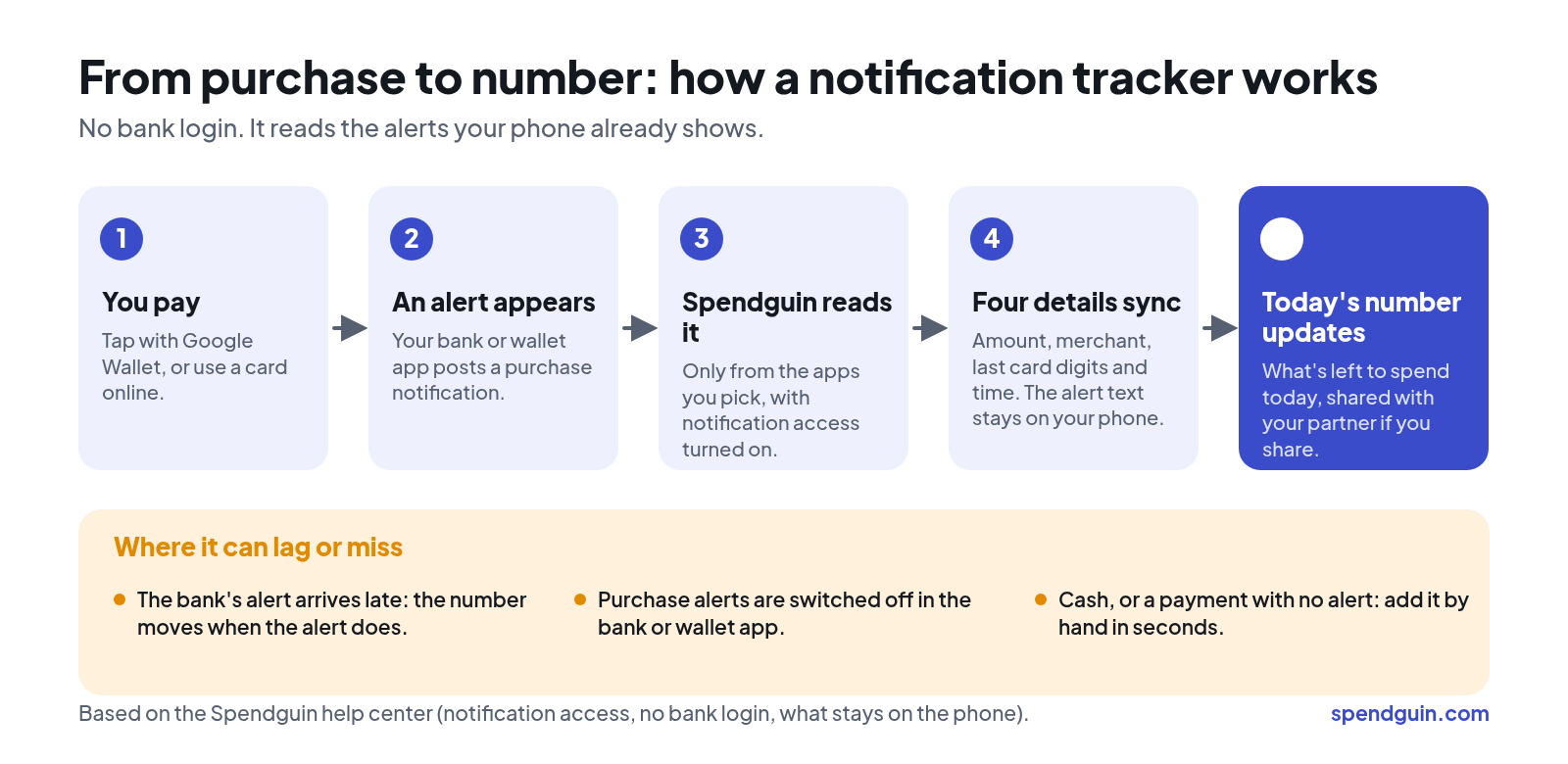 Figure 1. How a notification-based tracker gets from purchase to number. It reads alerts your phone already shows, from the apps you pick. Based on the Spendguin help center.
Why timing might matter
Three strands of research point the same way, with caveats.
Delay weakens learning. Lattal's review of delayed reinforcement describes how the effect of a consequence shrinks as the delay grows, more steeply when nothing signals the delay (Lattal, 2010). Most of that work is in laboratory and animal settings, so it is a reason to take timing seriously, not proof about people with budgets.
Immediate feedback has changed real behavior, modestly. In energy use, a review found direct feedback (a display you can see now) was associated with savings of about 5 to 15%, versus 0 to 10% for indirect feedback such as a later bill (Darby, 2006). In a hotel field experiment, guests who saw their energy use per shower in real time used 11.4% less energy per shower (Tiefenbeck et al., 2018). A broader meta-analysis, as summarized in a UCL evidence review, found an average of 7.4%, falling to about 2% in the most rigorous studies (UCL review of Delmas et al., 2013). Energy is not money, so treat these as a signal that immediacy can matter.
Watching progress helps people reach goals. A meta-analysis of 138 randomized trials (19,951 participants) found that prompting people to monitor goal progress improved goal attainment (d = 0.40), more so when progress was recorded (Harkin et al., 2016). BJ Fogg's behavior model adds that a behavior needs a prompt and has to be easy enough to do (Fogg, 2009). A number that appears when you spend is a prompt; one that needs ten minutes of upkeep is not easy.
What the money studies found
The spending-specific evidence is smaller and newer, and it's mixed.
- A bank-app overspending message. In a working paper on 55,586 users of a Canadian bank's app, people who got an overspending message spent C$8.15 less the next day, about 5.4% of their average daily spending, and the reduction persisted in cumulative spending. They also logged in less afterward, which the author calls the "ostrich effect" (Lee, 2019). It's a working paper, and the message arrived the day after.
- Weekly goal feedback. In a field experiment with credit-card customers, weekly feedback plus making transactions more visible was linked to lower spending only when it showed both ordinary and exceptional purchases. By one measure one group spent 13.1 percentage points less than control, but the formal comparison of medians (6.0 points) was only marginally significant (p = .10). The feedback was weekly, not real time (Huebner, Fleisch & Ilic, 2020). The practical takeaway: an incomplete picture seems to weaken the effect.
- A one-number budget that did nothing. Irrational Labs ran a 13-week experiment with 9,035 budgeting-app users. A single weekly number did not change average spending versus a control group ($681 vs $676, not significant), and 84% of users viewed their budget five times or fewer (Irrational Labs). A reasonable reading is that a number only helps if people see it, in the moment, repeatedly. That is a hypothesis, not what that study tested.
- Side effects. In a Brazilian field experiment, payment reminders cut credit-card late fees by 14% but raised overdraft fees by 9% (Medina, 2021).
Overall: timely information can move spending a little, for some people, under some conditions.
When real-time feedback backfires
- Precise feedback can invite spending the surplus. In a technical report, Ghosh and Huang found that precise budget feedback could raise end-of-period spending when money was left over. The effect was weaker with rollovers, shorter budget windows and less precise information (Ghosh & Huang, 2020). It's not peer reviewed. A daily window with carry-forward fits the attenuating design, but we haven't tested that for Spendguin.
- People avoid numbers that feel bad. See the ostrich effect above (Lee, 2019). A tracker's tone matters.
- Incomplete data weakens the number. Which brings us to what a notification-based tracker can and can't see.
The daily number, explained
A daily number is usually your pay-period target divided by the days in the period, with each counted purchase coming off today's amount. In Spendguin, you set one target for the pay period and it turns that into a daily amount; leftover or overage from earlier days in the same period adjusts today's number (help center). To work out your own number, see how to set a daily spending limit.
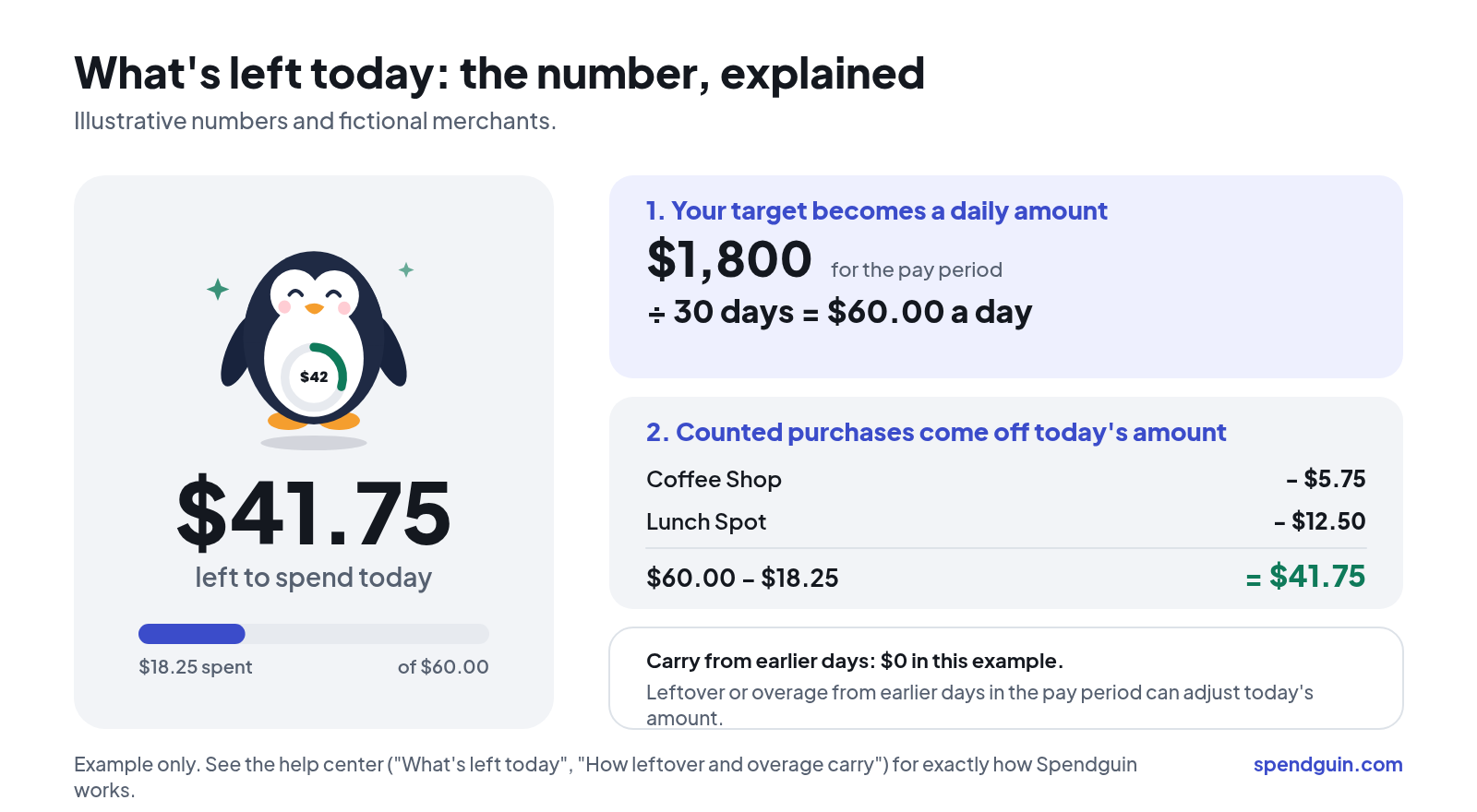 Figure 2. Illustrative numbers and fictional merchants. See the help center for exactly how carry works.
What it can see, and what it can miss
A tracker that reads purchase alerts is only as complete as those alerts. Spendguin's own limits, plainly:
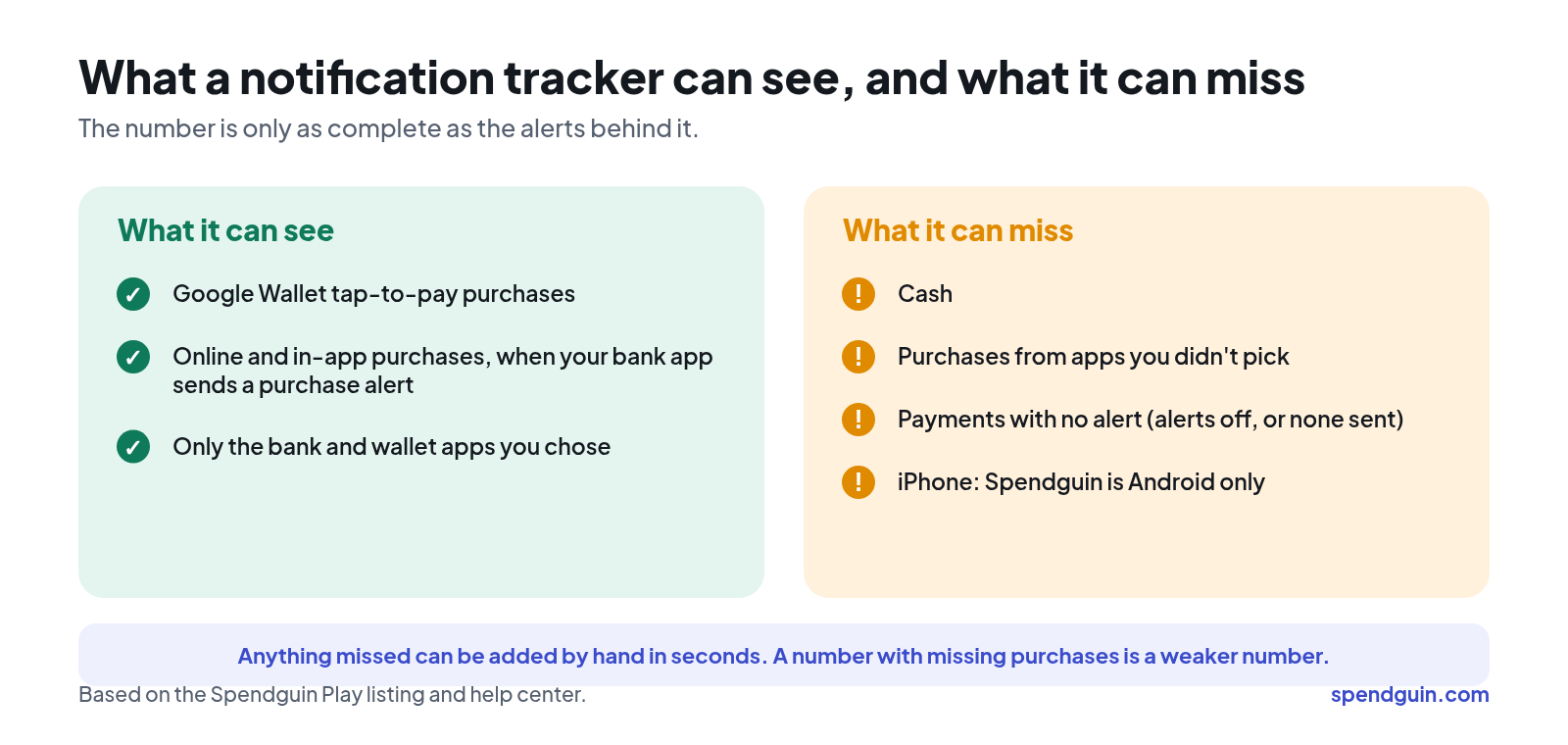 Figure 3. What a notification tracker can see and what it can miss. Anything missed can be added by hand in seconds.
It's Android only; Google Wallet captures tap-to-pay, and online purchases need your bank's purchase alerts turned on. Only the amount, merchant, last card digits and time sync to your household; the alert text stays on your phone (help center).
Four ways a tracker learns about a purchase
"Real time" depends mostly on how the app finds out you spent money. These are the four common routes:
| Method | How it learns of a purchase | Typical delay | Effort | Main blind spot |
|---|---|---|---|---|
| Bank-linked sync | An aggregator pulls transactions from your bank | Depends on the app and bank. Plaid, one major aggregator, documents checking "between one and four times per day," and a purchase usually moves from pending to posted one to five business days later (Plaid docs). Apps can sometimes request faster refreshes. | Low after setup | Needs your bank credentials to go through a third party; pending items can change when they post |
| Manual entry | You type it | As fast as you are | High | Forgotten entries; the habit tends to fade |
| Reading purchase alerts | The app reads the alert from your wallet or bank app | About when the alert arrives | Low | Only sees purchases that produce an alert |
| Statement import or spreadsheet | You import or paste later | Days to weeks | Medium | It looks back, not forward |
None of these is automatically best. Bank sync can be complete but delayed; alerts can be fast but partial; manual entry is exact but easy to drop. The question to ask is how long the gap is between tapping your card and seeing the number, in the tool you will actually use. Our simple budget app guide covers why effort matters so much to whether people keep tracking. If keeping your bank login out of it matters most, see budget apps that don't need your bank login.
How to tell whether a tracker is really real time
Ask any tool these six questions:
- How does it find my purchases? Alerts, a bank link, or typing?
- When does the number change? Right when I pay, or later?
- Does it show one number I can act on, or a report? A report is looking back.
- What does it miss, and how do I fix that? Cash, transfers, alerts that don't arrive.
- What does it need from me? A bank login? Categories? Daily upkeep?
- What leaves my phone? Read the privacy page.
Does it help you? Test it
Because the research is modest and mixed, the honest answer is "try it and see." Our suggestion, not a research finding: use any tracker for four weeks, glance at the number before discretionary purchases, and notice whether you look at it, not just whether you spend less. If you stop looking, the design isn't working for you, whatever the studies say. The pillar guide covers why habits take weeks, not days.
If you'd rather use a spreadsheet
A spreadsheet is a fine real-time tracker if you open it at the moment of a purchase. Three cells do the job:
- Spending money for the pay period = income - fixed bills - savings.
- Daily amount = spending money / days in the pay period.
- Left today = daily amount x days so far - total spent so far.
Example with made-up numbers: $700 of spending money over 14 days is $50 a day. On day 5, with $180 spent, you have $50 x 5 - $180 = $70 left today. The catch is entry: logging every purchase by hand is the step people tend to drop, which is the argument for keeping the whole system simple. For what to do on the day the number goes negative, see how to stick to a budget.
Where Spendguin fits, and where it doesn't
Spendguin is built around two ideas from this guide: feedback in the moment, and as little effort as possible.
- You set one spending target for your pay period (monthly, twice a month, weekly, or every 2 weeks); Spendguin turns it into a daily amount.
- It picks up purchases from your Google Wallet and bank-app notifications. Nothing to type, and it never connects to your bank account (no bank login).
- It alerts you on every purchase, when you're getting close to today's amount, and when you're over it. Those alerts are free, and so is the daily Today screen.
- Partner sharing is free. Pro is a paid subscription after a trial, and adds spreading big purchases over pay periods, a day-before heads-up on recurring charges, a nightly recap and Monday week-ahead, choices for what to do with an overspend when a pay period ends (spread it or carry it to the first day), and older history (Free shows the last 30 days). Pro features show as locked on Free. See the help center for exactly what is on each plan.
What it doesn't do: it's Android only, it needs notification access, and it can only see what alerts show. It tracks spending you've already made. It doesn't move money or give financial advice. And it hasn't been tested in a controlled trial; we built it on ideas from behavior science without proving it changes behavior.
Sources
- Lattal, K. A. (2010). Delayed reinforcement of operant behavior. J Exp Anal Behav, 93(1), 129-139. Accessed .
- Darby, S. (2006). The effectiveness of feedback on energy consumption. Oxford ECI (review report). Accessed .
- Tiefenbeck, V., et al. (2018). Real-time feedback promotes energy conservation in the absence of volunteer selection bias and monetary incentives. Nature Energy. Accessed .
- UCL Energy Institute evidence review (summarizes Delmas, Fischlein & Asensio, 2013; secondary source). Accessed .
- Fogg, B. J. (2009). A behavior model for persuasive design. Persuasive '09, ACM. Accessed .
- Harkin, B., et al. (2016). Does monitoring goal progress promote goal attainment? A meta-analysis. Psychological Bulletin, 142(2), 198-229. Accessed .
- Lee, S. K. (2019). Fintech nudges: Overspending messages and personal finance management. SSRN working paper (not peer reviewed). Accessed .
- Huebner, J., Fleisch, E., & Ilic, A. (2020). Assisting mental accounting using smartphones. Computers in Human Behavior, 113, 106504. Accessed .
- Ghosh, A. P., & Huang, L. (2020). Dynamic budget monitoring: When access to budget feedback leads to increase in spending. Think Forward Initiative technical report (not peer reviewed). Accessed .
- Irrational Labs. Budgeting: What our research uncovered (13-week experiment, N = 9,035). Accessed .
- Medina, P. C. (2021). Side effects of nudging. Review of Financial Studies, 34(5), 2580-2607 (the title uses the word 'nudging'). Accessed .
- Lush, M., Meagher, K., & Fontes, A. (2020). Personal financial management tools: Delivering on the promise of convenient financial well-being? Consumer Interests Annual, 66. Accessed .
- Spendguin help center: No bank login; Turn on notification access; What's left today. Accessed .
- Plaid developer documentation. Transactions webhooks (update frequency) and Transaction states (pending vs posted). Vendor documentation, not independent testing. Accessed .
FAQ
What is a real-time spending tracker?
A tool that shows how a purchase changes your budget at or near the moment it happens, instead of in a month-end report. How close to real time it gets depends on how it captures purchases: from alerts, from a bank connection, or from you typing them in.
Is a notification-based tracker really real time?
It updates when your bank or wallet app posts the alert, so it is as quick as that alert. If the alert is late, switched off, or never sent, the number lags or misses the purchase. Anything missed can be added by hand.
Does real-time tracking help you spend less?
It can, modestly, for some people. Real-time energy feedback cut household use by roughly 5 to 15% in one review, and one bank-app study found about a 5% drop in next-day spending after an overspending message. A one-number weekly budget showed no effect in a large 13-week test where most people rarely looked at it. The evidence supports 'can help under the right conditions', not 'proven'.
Do I need to link my bank?
Not for every tracker. Some read the purchase alerts your phone already shows, so no bank username or password is involved. Spendguin works this way and never connects to your bank account.
Can real-time feedback backfire?
Yes. In one technical report, precise real-time budget feedback led people to spend leftover money late in the period, and in another study people who got an overspending message checked their accounts less afterward. Short windows, carry-forward and a kind tone help.
Is there a free real-time spending tracker?
Several apps have free tiers, but what is free varies, so check whether the free tier includes the live daily number, purchase alerts and how much history you get. Spendguin Free includes the daily Today screen and alerts on every purchase, when you are getting close to today's amount and when you are over it; older history is Pro (Free shows the last 30 days). Pro is a paid subscription after a trial.
Is there a spending tracker that does not need my bank login?
Yes. Manual-entry apps and spreadsheets never touch your bank, and some apps read purchase alerts on your phone instead. Spendguin does the latter on Android: it picks up purchases from wallet and bank-app notifications and never connects to your bank account. The trade-off is that it can only see what alerts show.
Spendguin shows what’s left to spend today by reading the purchase alerts you already get. No bank login.