How to track subscriptions without linking your bank
A one-time audit to find what you pay for, a simple list to keep it current, and ways to catch new charges without linking a bank.
Part of the series that starts with Budget apps that don't need your bank login (and how they work).
Try it for free on Google Play
Spendguin is our product, so we're a biased source. Spendguin is an Android budgeting app that shows what's left to spend today by reading purchase alerts from your bank and wallet apps. No bank login. Where the research is mixed, we say so, and no study has tested Spendguin itself. 🐧
Why subscriptions are easy to lose track of
They're small, they renew on their own, and they rarely ask for your attention. In a 2022 survey of 1,000 US consumers by C+R Research, people first guessed they spent $86 a month on subscriptions; when they listed them one by one, the average was $219. In the same survey, 74% said it was easy to forget about recurring charges, 42% said they'd kept paying for a service they'd stopped using, and 72% paid all their subscriptions on autopay (C+R Research). It's a self-reported online survey, not a measurement of anyone's statements, but the gap between the guess and the list is the useful part.
Step 1: a one-time audit
Set aside half an hour. The goal is a complete list, not a decision yet.
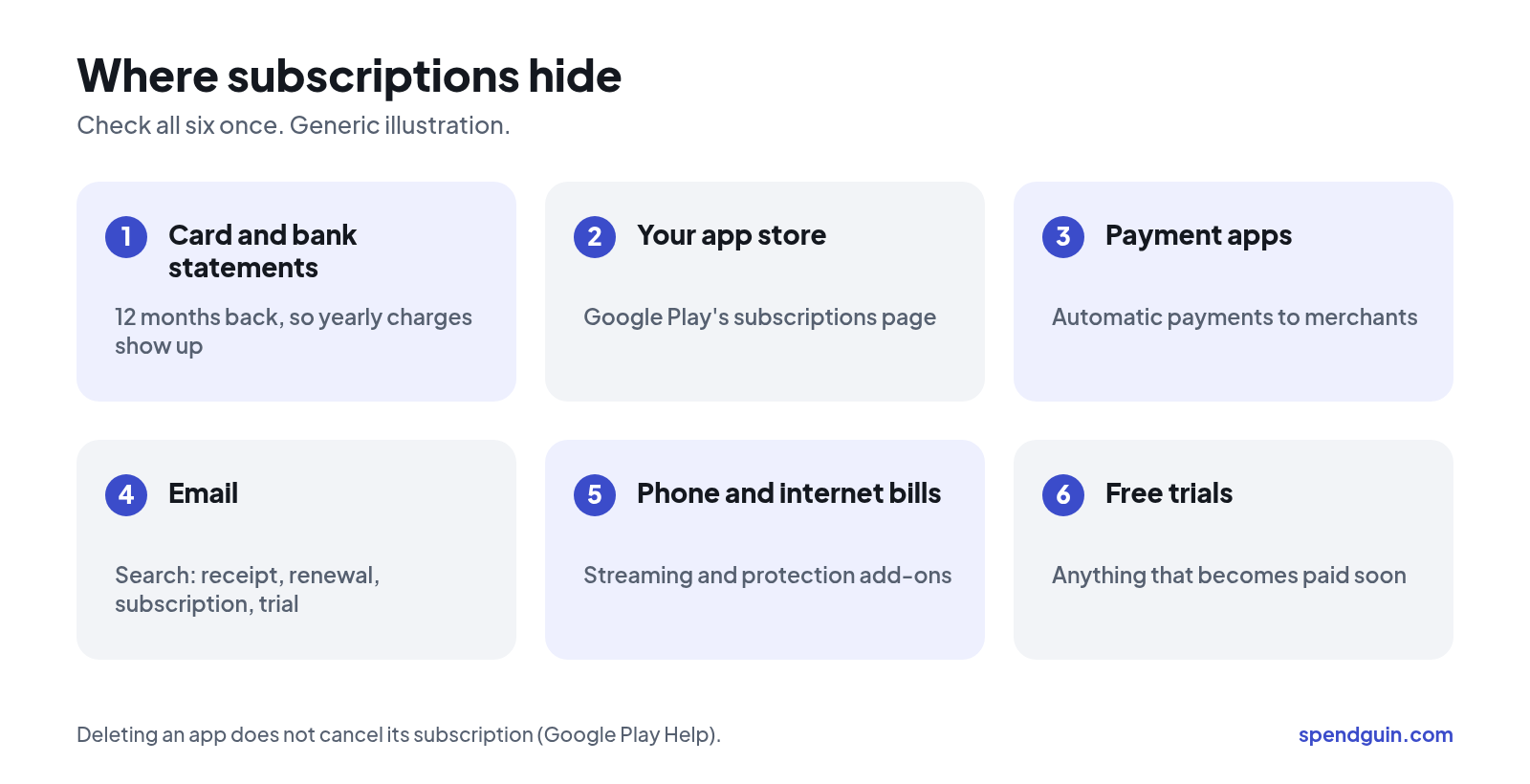 Figure 1. Where to look during the audit. Generic illustration.
- Card and bank statements, 12 months back. One month misses yearly charges: software, domain names, memberships, insurance add-ons. Check every card, including ones you rarely use.
- Your app store. On Android, open Google Play's subscriptions page to see what's billed through Play (Google Play Help).
- Payment apps. Many let you see and stop automatic payments to merchants.
- Email. Search for "receipt", "renewal", "subscription", "your plan" and "trial".
- Phone and internet bills. Streaming and device-protection add-ons often ride on these.
- Trials you started. If you signed up "free for a month", it's probably a paid subscription soon.
Step 2: make a list you'll actually keep
A spreadsheet or a note on your phone is plenty. One row per subscription:
| Name | Amount | Cycle | Next charge | Card | Keep? |
|---|---|---|---|---|---|
| Streaming service | $15.99 | Monthly | 3rd | Card ending 1234 | Yes |
| Cloud storage | $2.99 | Monthly | 18th | Card ending 1234 | Yes |
| Design software | $119.99 | Yearly | March 9 | Card ending 5678 | Review |
Made-up examples.
Add a monthly total, and for yearly charges divide by 12 so you can compare like with like. Then go down the "Keep?" column. A useful test: would you sign up for this today, at this price?
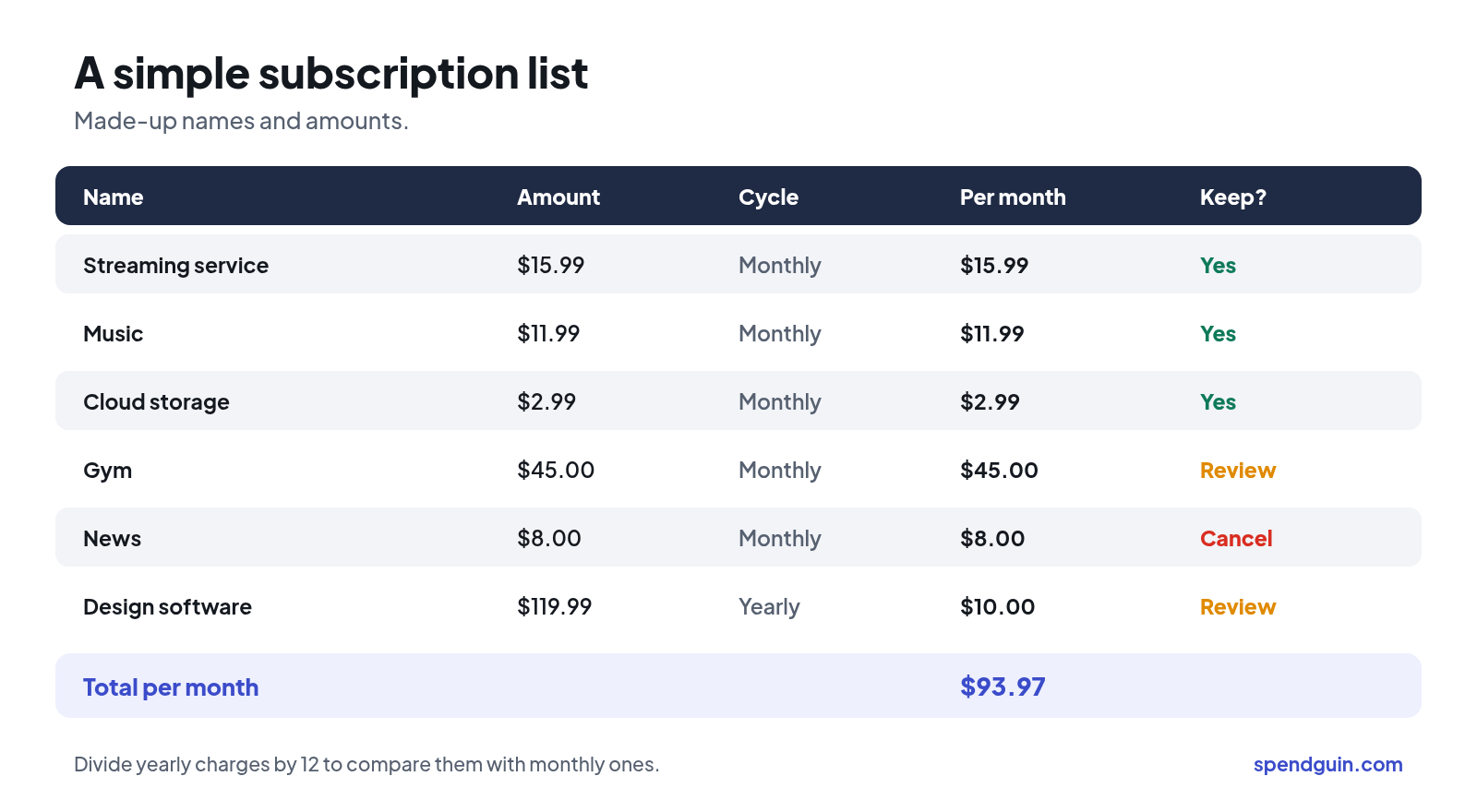 Figure 2. A simple subscription list. Made-up names and amounts.
Step 3: cancel the right way
- Cancel where you signed up. App store subscriptions are cancelled in the store; others on the company's site or app.
- Deleting the app isn't cancelling. Google Play says uninstalling an app doesn't cancel its subscription (Google Play Help).
- Cancelling early usually doesn't cost you the time you paid for. On Google Play, you keep access until the end of the period you paid for. Other services have their own rules; check before you cancel.
- Keep the confirmation until the next billing date passes without a charge.
Step 4: keep it current without linking your bank
Pick one or two of these. You don't need all of them.
| Method | Bank login? | Effort | Catches |
|---|---|---|---|
| Calendar reminders | No | Low once set up | Renewals and trial end dates you entered |
| Monthly statement check | No | About 10 minutes a month | Everything on the cards you check, after it posts |
| Your bank's own app | No extra app | Low | Depends on the bank; some flag recurring payments |
| Bank-linked subscription tracker | Yes, through an aggregator | Low | Charges on linked accounts, with a delay |
| App that reads purchase alerts | No | Low | New charges as they post, if alerts are on |
The last row is how notification-based tracking works: it sees a charge when your bank's alert arrives. It won't see a charge on a card that doesn't send alerts, and it can't tell you about a renewal before the charge unless the subscription is already on its list.
Free trials: the two-minute habit
When you start a trial, before you close the signup page:
- Put the end date in your calendar with a reminder a day or two before.
- Note which card it's on.
- If you already know you won't keep it, consider cancelling now. Some services let you keep using the trial until it ends; others end it right away, so check the service's cancel page first.
Subscriptions and your daily budget
Subscriptions are spending, so they belong in your budget once. There are two ways to do it:
- As fixed bills. Take them out of your income before you work out your spending money, the way our daily spending limit guide does. This fits best if they're charged to a card you don't count day to day.
- As they land. Leave them in your spending money and let each charge come off the day it posts. Simpler, but a $119.99 yearly charge will take a big bite out of one day.
Don't do both, or every subscription counts twice. If you're paid weekly or every two weeks, the paycheck budget guide shows how to give each paycheck its share of the monthly bills.
How Spendguin handles subscriptions
Spendguin doesn't connect to your bank, so it learns about subscriptions from the purchase alerts it reads (recurring overview):
- The "Recurring?" prompt. When a charge comes from a well-known subscription service, or the same merchant charges about the same amount again about a month later, Spendguin asks "Recurring?". Tap Yes and it goes on your Recurring list, where you can set the amount, a monthly or yearly cycle and the day. You can also open any purchase and make it recurring. This is free.
- No empty form. You can't add a recurring charge with no purchase behind it; the list starts from real charges you've captured.
- An alert when it posts. Each time a tracked recurring charge comes through, you get an alert asking whether you still want it. Free.
- A day-before heads-up for tracked recurring charges is a Pro feature.
- It counts. A recurring charge comes off today's number like any purchase, unless you mark it not counted. So if you set your target after taking subscriptions out as fixed bills, mark those charges Don't count.
What it doesn't do: it doesn't look back at charges from before you installed it, it doesn't see cards that don't send alerts, and it doesn't cancel anything for you.
Where Spendguin fits, and where it doesn't
Spendguin is built for people who want to see spending as it happens, subscriptions included, without linking a bank.
- You set one spending target for your pay period (monthly, twice a month, weekly, or every 2 weeks), and Spendguin turns it into a daily amount.
- It picks up purchases from your Google Wallet and bank-app notifications. There's nothing to type, and it never connects to your bank account (no bank login).
- Overspend today and it comes off the days after, within the same pay period. A new period starts fresh: leftover money doesn't roll into it.
- Free: the daily Today screen; alerts on every purchase, when you're getting close to today's amount and when you're over it; the "Recurring?" prompt; refund alerts; 30 days of history; and Together, partner sharing for two people.
- Pro ($4.99 a month or $39.99 a year in USD or CAD, after a 30-day free trial with no card needed, starting when the first purchase notification arrives): spreading a big purchase over several pay periods, a heads-up the day before a recurring charge, a nightly recap and a Monday week-ahead, a choice when a period ends over (spread the overspend across the new period or take it off day one), and full history. Pro features show as locked on Free.
What it doesn't do: it's Android only, it needs notification access, and it can only see what alerts show, so cash and anything without an alert has to be added by hand. It tracks spending you've already made. It doesn't move money or give financial advice. And it hasn't been tested in a controlled trial; we built it on ideas from behavior science, not proof that it changes behavior.
Sources
- C+R Research (2022, updated 2024). Subscription service statistics and costs. Online survey of 1,000 US consumers, April-May 2022 (self-reported). Accessed .
- Google Play Help: Cancel, pause, or change a subscription on Google Play. Accessed .
- Spendguin help center: Recurring overview; The Recurring? prompt; Day-before heads-up (Pro). Accessed .
FAQ
How do I find all my subscriptions?
Go through 12 months of card and bank statements, not just one, so yearly charges show up. Then check your app store's subscriptions page, your payment apps' automatic payments, and your email for words like receipt, renewal and subscription. Write each one down with its amount, cycle and next charge date.
How do I track subscriptions without linking my bank?
Keep a simple list or spreadsheet, put each renewal date in your calendar with a reminder a day or two before, and review statements monthly. On Android, an app that reads your bank's purchase alerts can also spot recurring charges as they post, without a bank login.
Does uninstalling an app cancel its subscription?
No. Google Play says uninstalling an app doesn't cancel its subscription. Cancel it from the subscriptions page in Google Play, or from wherever you signed up.
How do I avoid being charged after a free trial?
Write down the end date when you start the trial and set a reminder a day or two before. If you know you won't keep it, cancel right away. Some services let you keep using a trial until it ends after you cancel; others end it immediately, so check first.
Should subscriptions be part of my daily budget?
Decide once and stick to it. Either take subscriptions out as fixed bills before you set your spending money, or leave them in and let each charge come off the day it lands. Doing both counts them twice.
Does Spendguin find my subscriptions?
It spots likely subscriptions from purchase alerts as they come in and asks "Recurring?". It doesn't look back at charges from before you installed it, and it doesn't cancel anything for you.
Spendguin shows what’s left to spend today by reading the purchase alerts you already get. No bank login.