Budget apps that don't need your bank login (and how they work)
How bank linking works, four ways to budget without it, and the trade-offs of each.
Try it for free on Google Play
Spendguin is our product, so we're a biased source. Spendguin is an Android budgeting app that shows what's left to spend today by reading purchase alerts from your bank and wallet apps. No bank login. Where the research is mixed, we say so, and no study has tested Spendguin itself. 🐧
Why people skip bank linking
Common reasons are privacy, not wanting to hand a bank login to another company, connections that break and need re-linking, and simply wanting a lighter tool. Some people don't want every transaction in a third-party database; others just want a daily number, not a full financial dashboard. None of these is wrong, and bank linking has real benefits too: it can be complete and nearly hands-free.
How bank linking usually works
Most budgeting apps that link to your bank use a data aggregator, a company that connects to thousands of banks on the app's behalf. Plaid, one of the largest, describes a few connection types (Plaid Consumer Help Center):
- OAuth: you're sent to your bank's own website or app to sign in and approve access. The app never sees your password, and Plaid says it doesn't store your credentials.
- API with your login entered in Plaid's screen: Plaid says it connects without storing your credentials.
- Non-OAuth: you give your bank login to Plaid, which says it stores those credentials and uses them to collect your data.
Updates aren't instant either. Plaid's developer documentation says it typically checks for new transactions one to four times a day, depending on the bank (Plaid docs).
In the US, the Consumer Financial Protection Bureau finalized a rule on personal financial data rights in 2024, but a court stayed its compliance dates on October 29, 2025, and the CFPB is reconsidering it (CFPB). So the rules for how apps access bank data are still unsettled.
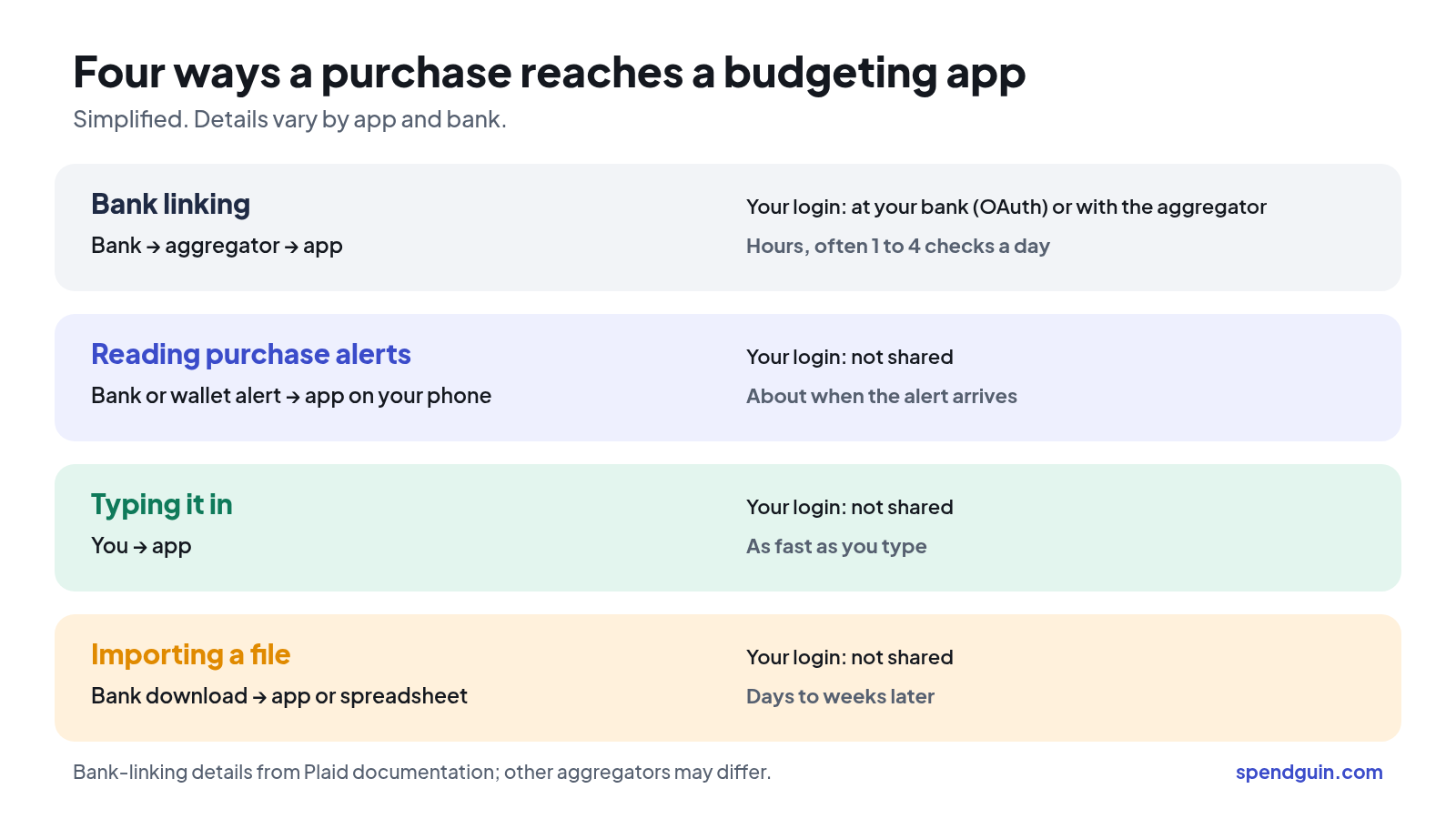 Figure 1. Four ways a purchase can reach a budgeting app. Simplified; details vary by app and bank.
Four ways to budget without linking your bank
1. Manual-entry and envelope apps
You type each purchase, or assign money to envelopes and record spending against them. Goodbudget, for example, is built around digital envelopes. Nothing touches your bank, and typing each purchase keeps you aware of it. The cost is effort: manual work is one of the burdens people name when they stop using finance apps (Lush, Meagher & Fontes, 2020).
2. Offline loggers
Some apps keep everything on your phone. Simple Budget, for example, describes itself as private and offline. Strong on privacy, but you still log each expense.
3. Importing a file from your bank
Many banks let you download transactions as a spreadsheet file, which some apps and spreadsheets can import. No login is shared, and the data is complete for that account. But you're always looking back: an import shows last week, not today.
4. Apps that read purchase alerts
Your bank and wallet apps can already send a notification when you pay. On Android, an app with notification access can read those alerts from apps you choose and turn them into purchases. Spendguin works this way. Purchases appear about when the alert arrives, with no typing and no bank login. The limit is coverage: it only sees purchases that produce an alert, so cash and some transfers have to be added by hand, and it depends on alerts being turned on in your bank or wallet app (Spendguin help center). For the step-by-step version, including what gets filtered out and what never shows up, see how notification-based tracking works.
The trade-offs side by side
| Method | Bank login shared? | Effort | How current | Main blind spot |
|---|---|---|---|---|
| Bank-linked app | Through an aggregator (OAuth or credentials) | Low after setup | Depends on the app; Plaid documents 1 to 4 checks a day | Connections can break; your data sits with more companies |
| Manual or envelope app | No | High | As fast as you type | Forgotten entries; the habit fades |
| Offline logger | No | High | As fast as you type | Same as manual |
| File import | No | Medium | Days to weeks behind | Always looking back |
| Alert-reading app | No | Low | About when the alert arrives | Only sees purchases with an alert; Android only for Spendguin |
What to check before you choose
- Where does my login go? If the app links to banks, does it use OAuth with your bank?
- What data does the app collect? Read the privacy policy and the Play Store data-safety section.
- How does it get purchases, and how fast? Ask how long the gap is between paying and seeing it.
- What does it miss? Cash, transfers, a second card? Subscriptions are a common blind spot; see how to track subscriptions without linking your bank.
- Can two people use it? If you share spending with a partner, check whether sharing costs extra and whether either of you has to hand over a bank login; see couples budgeting without merging everything.
- Will I still use it in week three? Effort is the usual reason people stop; see budgeting feels too complicated.
- Can I leave easily? Can you export your data or delete your account?
For what "real time" means in a tracker and how to test it, see our real-time spending tracker guide. For choosing among simple apps, see the simple budget app guide. And for why fast, easy feedback matters at all, see the pillar guide, why budgets fail.
Where Spendguin fits, and where it doesn't
Spendguin is built for people who want a daily spending number without linking a bank.
- You set one spending target for your pay period (monthly, twice a month, weekly, or every 2 weeks), and Spendguin turns it into a daily amount.
- It picks up purchases from your Google Wallet and bank-app notifications. There's nothing to type, and it never connects to your bank account (no bank login).
- Overspend today and it comes off the days after, within the same pay period. A new period starts fresh: leftover money doesn't roll into it.
- Free: the daily Today screen; alerts on every purchase, when you're getting close to today's amount and when you're over it; the "Recurring?" prompt; refund alerts; 30 days of history; and Together, partner sharing for two people.
- Pro ($4.99 a month or $39.99 a year in USD or CAD, after a 30-day free trial with no card needed, starting when the first purchase notification arrives): spreading a big purchase over several pay periods, a heads-up the day before a recurring charge, a nightly recap and a Monday week-ahead, a choice when a period ends over (spread the overspend across the new period or take it off day one), and full history. Pro features show as locked on Free.
What it doesn't do: it's Android only, it needs notification access, and it can only see what alerts show, so cash and anything without an alert has to be added by hand. It tracks spending you've already made. It doesn't move money or give financial advice. And it hasn't been tested in a controlled trial; we built it on ideas from behavior science, not proof that it changes behavior.
Sources
- Plaid Consumer Help Center: What are the different ways third party apps using Plaid can connect to my financial accounts? Vendor documentation. Accessed .
- Plaid developer documentation: Transactions webhooks (update frequency). Vendor documentation, not independent testing. Accessed .
- Consumer Financial Protection Bureau. Personal financial data rights (Section 1033 rule status page). Accessed .
- Lush, M., Meagher, K., & Fontes, A. (2020). Personal financial management tools: Delivering on the promise of financial well-being? Consumer Interests Annual (survey of 1,059 US adults). Accessed .
- Goodbudget home page (product description; checked November 2026). Accessed .
- Simple Budget home page (product description; checked November 2026). Accessed .
- Spendguin help center: No bank login; Turn on notification access. Accessed .
FAQ
Is there a budget app that doesn't connect to your bank?
Yes. Manual-entry and envelope apps, offline loggers, spreadsheets and apps that read purchase alerts on your phone all work without a bank connection. They trade convenience in different ways: manual apps need typing, file imports are delayed, and alert-reading apps only see purchases that produce an alert.
Do budget apps connect to bank accounts?
Many do, usually through a data aggregator such as Plaid. Depending on your bank, you either sign in on the bank's own site (OAuth), where the app never sees your password, or enter your bank login into the aggregator's screen. Plenty of apps also offer a manual mode.
Are budgeting apps that connect to your bank safe?
It depends on the app, the aggregator and your bank, and we can't rate any particular one. Ask how the connection works: with OAuth you sign in at your bank and can usually revoke access there; with non-OAuth connections, Plaid says it stores your credentials. Read the app's privacy policy and Play Store data-safety section before linking.
Can I track spending automatically without linking my bank?
Partly. On Android, some apps read the purchase notifications your bank or wallet app already shows, so purchases appear without typing and without a bank login. The catch is coverage: anything that doesn't trigger an alert, such as cash, has to be added by hand.
Is Spendguin free?
Yes, to start. The daily Today screen, alerts on every purchase, getting-close and over-today alerts, and Together partner sharing are free. Pro is $4.99 a month or $39.99 a year (USD or CAD) after a 30-day free trial with no card needed, starting when the first purchase notification arrives.
Spendguin shows what’s left to spend today by reading the purchase alerts you already get. No bank login.