Safe to spend: what it means and how to work out yours
How safe to spend differs from your balance, how to work it out for the pay period and for today, and when the number can mislead you.
Part of the series that starts with Daily spending limit: how to set one that lasts the whole pay period.
Try it for free on Google Play
Spendguin is our product, so we're a biased source. Spendguin is an Android budgeting app that shows what's left to spend today by reading purchase alerts from your bank and wallet apps. No bank login. Where the research is mixed, we say so, and no study has tested Spendguin itself. 🐧
Three numbers that look alike
Your banking app might show two balances, and a budgeting app might show a third number. They answer different questions.
| Number | What it tells you | What it leaves out |
|---|---|---|
| Account balance | Money in the account right now | Pending purchases and holds |
| Available balance | What the bank will let you spend right now (usually after pending purchases and holds) | Bills coming up, savings you planned, irregular costs |
| Safe to spend | What you can spend without shorting your plans | Only as good as the bills and goals you put into it |
The available balance is the one that trips people up. It looks like permission to spend, but the bank doesn't know your rent is due on Monday.
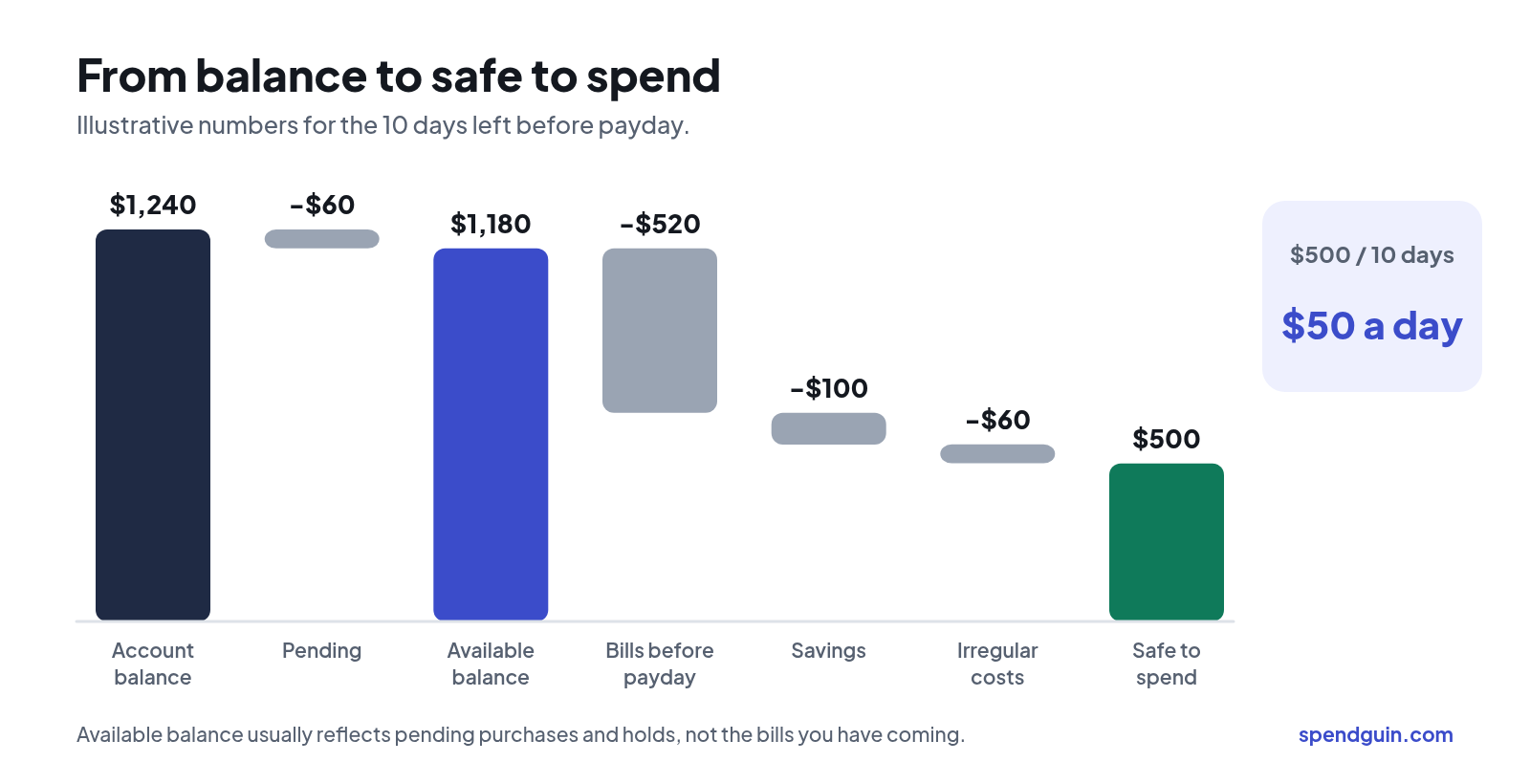 Figure 1. From account balance to safe to spend. Illustrative numbers, not advice for your situation.
How to work out your safe-to-spend amount
For the rest of the pay period
- Start with your available balance in the account you spend from.
- Subtract bills due before your next payday. Rent, phone, insurance, loan payments, subscriptions. Only the ones that will come out before the next paycheck lands.
- Subtract savings you haven't moved yet. If you save on payday, this may already be done.
- Subtract your set-aside for irregular costs. Car repairs, gifts, annual fees: a year of them divided by your paychecks a year.
- What's left is safe to spend until payday.
For today
Divide the period amount by the days left until payday, counting today. With $500 safe to spend and 10 days to go, that's $50 a day.
If you'd rather start from your income than your balance, the daily spending limit guide works it out from take-home pay, and the paycheck budget guide shows how to do it for weekly, every-two-weeks and twice-a-month pay.
Two ways to get a number for today
Once you have a period amount, there are two common ways to turn it into "what's safe today". They agree on the first day and drift apart after a cheap or expensive day.
- Recalculate every day. Each morning, divide what's left in the period by the days left. Spend less today and every later day grows a little.
- Fixed daily amount plus a buffer. Keep the same daily amount for the whole period. What you don't spend goes into a buffer you can use later; what you overspend comes out of it. Spend less today and tomorrow has the full difference.
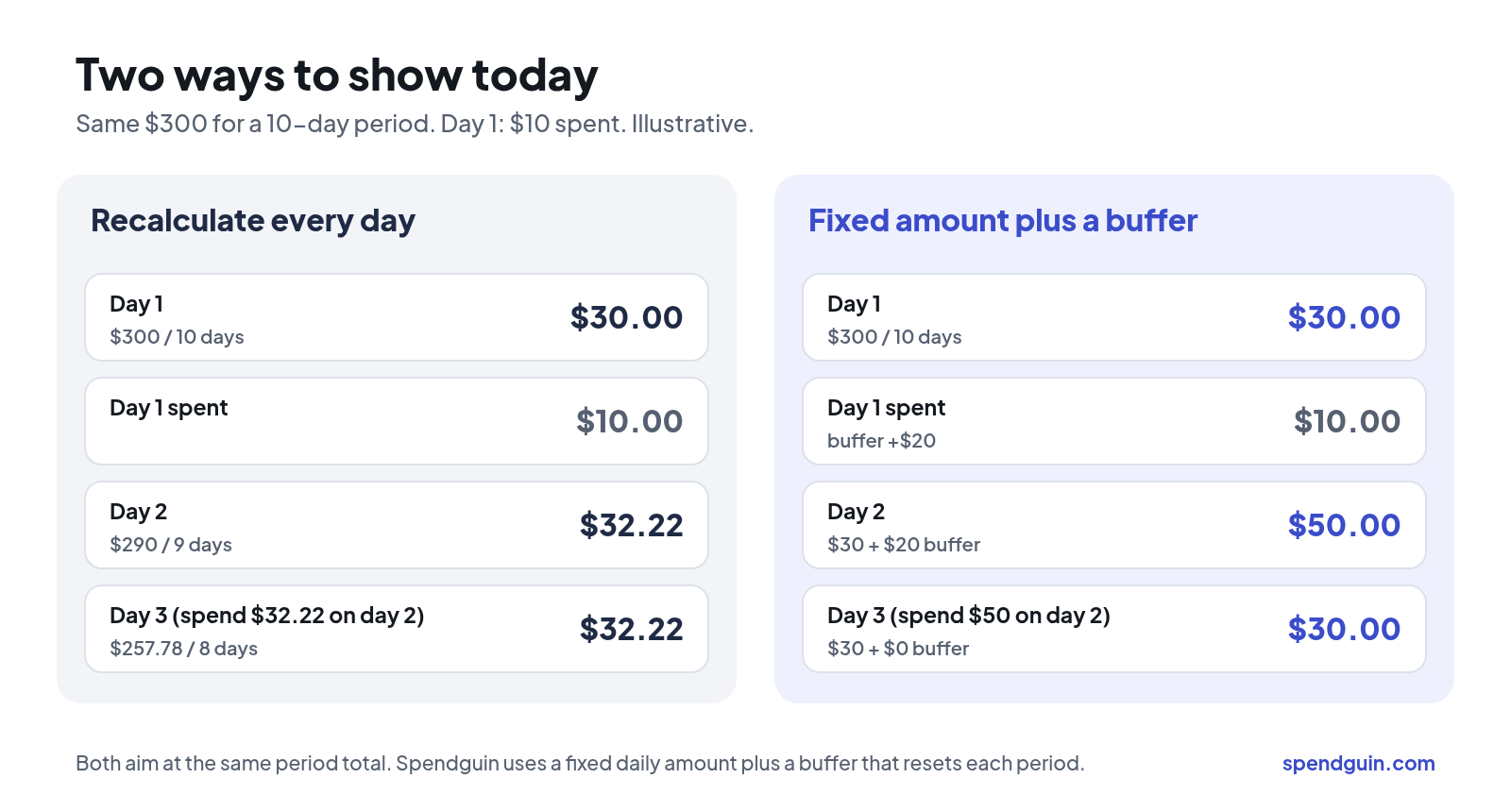 Figure 2. Same period, same spending, two ways to show today. Illustrative numbers.
Neither is more correct. Recalculating keeps every day even. A buffer shows you exactly what an earlier cheap day bought you, and makes a bad day's cost obvious the next morning. Both still aim at the same total for the period.
When a safe-to-spend number misleads you
- A bill is missing. The number is only as honest as the list behind it. Annual charges and subscriptions you forgot about are the usual gaps.
- Purchases haven't shown up yet. If your tracker is a day behind, the number is too high. A number for today needs purchases that show up the same day.
- Cash and anything untracked. If it isn't counted, the number doesn't know about it.
- A big number can feel like permission. In a technical report on budget monitoring, precise, real-time budget feedback could actually raise spending late in a period when people had money left, because it showed them how much they could safely spend (Ghosh & Huang, 2020). If your buffer grows, you don't have to spend it.
- No cushion. A safe-to-spend number assumes nothing surprising happens before payday. In a Federal Reserve survey, 63% of US adults said they could cover a $400 emergency with cash or its equivalent, which leaves more than a third who couldn't (Federal Reserve, 2025). A small buffer inside your set-asides makes the number sturdier.
Does seeing it help?
It can, if you look at it. A meta-analysis of 138 randomized trials found that monitoring progress improved goal attainment, with a small-to-moderate effect (Harkin et al., 2016). But in a 13-week test with 9,035 budgeting-app users, most people rarely looked at their budget, and average spending didn't change against a control group (Irrational Labs). A number you never check doesn't do anything. The best moment to glance at it is before a purchase you hadn't planned. Our guide to real-time spending trackers covers why timing matters.
How to use it day to day
- Check it before unplanned purchases, not at the end of the day.
- Recheck after payday and after any big bill, since that's when the period amount changes.
- Decide what a cheap day is for. Let the buffer build toward something specific, or leave it alone.
- After a bad day, keep going. The point of a period number is that one day doesn't decide it. See how to stick to a budget for the day after.
What Spendguin shows, exactly
Spendguin's Today screen is a safe-to-spend number for today, worked out from the spending target you set for your pay period. It uses the fixed-amount-plus-buffer method:
- Your daily amount is your target divided by the days in the period, and it stays the same all period.
- What you don't spend goes into a buffer for later days in the same period; overspending draws it down. A negative buffer lowers what's left today.
- What's left today = today's amount + the buffer - what you've spent today (what's left today).
- When a purchase takes you past today's amount but the buffer covers it, you get an "into your buffer" alert. Past the buffer too, you get an "over today" alert. Both are free.
- The buffer resets when a new period starts. Leftover money doesn't roll into the next period (how leftover and overage carry).
It doesn't read your bank balance and doesn't know your bills. You put those into the target when you set it.
Where Spendguin fits, and where it doesn't
Spendguin keeps a today number current as purchases come in, so the glance before a purchase is up to date.
- You set one spending target for your pay period (monthly, twice a month, weekly, or every 2 weeks), and Spendguin turns it into a daily amount.
- It picks up purchases from your Google Wallet and bank-app notifications. There's nothing to type, and it never connects to your bank account (no bank login).
- Overspend today and it comes off the days after, within the same pay period. A new period starts fresh: leftover money doesn't roll into it.
- Free: the daily Today screen; alerts on every purchase, when you're getting close to today's amount and when you're over it; the "Recurring?" prompt; refund alerts; 30 days of history; and Together, partner sharing for two people.
- Pro ($4.99 a month or $39.99 a year in USD or CAD, after a 30-day free trial with no card needed, starting when the first purchase notification arrives): spreading a big purchase over several pay periods, a heads-up the day before a recurring charge, a nightly recap and a Monday week-ahead, a choice when a period ends over (spread the overspend across the new period or take it off day one), and full history. Pro features show as locked on Free.
What it doesn't do: it's Android only, it needs notification access, and it can only see what alerts show, so cash and anything without an alert has to be added by hand. It tracks spending you've already made. It doesn't move money or give financial advice. And it hasn't been tested in a controlled trial; we built it on ideas from behavior science, not proof that it changes behavior.
Sources
- Ghosh, A. P., & Huang, L. (2020). Dynamic budget monitoring: When access to budget feedback leads to increase in spending. Technical report for the Think Forward Initiative. Accessed .
- Irrational Labs / Common Cents Lab. Budgeting: What our research uncovered. Field experiment with 9,035 budgeting-app users (industry report). Accessed .
- Harkin, B., et al. (2016). Does monitoring goal progress promote goal attainment? A meta-analysis of the experimental evidence. Psychological Bulletin, 142(2), 198-229. Accessed .
- Board of Governors of the Federal Reserve System (2025). Economic Well-Being of U.S. Households in 2024: Savings and Investments (SHED). Accessed .
- Spendguin help center: What's left today; How leftover and overage carry. Accessed .
FAQ
What does safe to spend mean?
It's the money you can spend right now without shorting anything you've already committed to: bills due before your next payday, savings and money set aside for irregular costs. Some apps show it for the whole pay period; others turn it into a number for today.
How do I calculate my safe-to-spend amount?
Start with your available balance, then subtract bills due before your next payday, any savings you haven't moved yet and your set-aside for irregular costs. What's left is safe to spend until payday. Divide it by the days left, including today, for a daily figure.
Is safe to spend the same as my available balance?
No. Your bank's available balance usually accounts for pending transactions and holds, but it doesn't know about rent due next week or money you meant to save. Safe to spend takes those out.
How much buffer should I keep?
There's no single rule. Even a small cushion helps a safe-to-spend number survive a surprise. In a Federal Reserve survey, 63% of US adults said they could cover a $400 emergency with cash or its equivalent, so a surprise of that size is a real risk for many people.
Does Spendguin show a safe-to-spend number?
It shows what's left to spend today. That number comes from the spending target you set for your pay period, plus or minus what you saved or overspent earlier in the period. It doesn't read your bank balance.
Spendguin shows what’s left to spend today by reading the purchase alerts you already get. No bank login.