Budgeting feels too complicated? 5 ways to simplify (and when to drop categories)
Why budgets get heavy, five ways to make yours lighter, and when categories are worth keeping.
Part of the series that starts with Why budgets fail: the feedback delay problem.
Try it for free on Google Play
Spendguin is our product, so we're a biased source. Spendguin is an Android budgeting app that shows what's left to spend today by reading purchase alerts from your bank and wallet apps. No bank login. Where the research is mixed, we say so, and no study has tested Spendguin itself. 🐧
If you're choosing an app, our simple budget app guide compares the kinds of "simple" apps. This guide is about the method, whatever tool you use.
Why budgets get complicated
BJ Fogg's behavior model lists six things that make a behavior simple or hard: time, money, physical effort, mental effort ("brain cycles"), social deviance and non-routine (Fogg, 2009). A typical detailed budget scores badly on several: it takes time each week, it asks for decisions about which category every purchase belongs in, and it often depends on a monthly routine that's easy to skip.
People do drop out. In a survey of 1,059 US adults, only 12% had ever used a third-party personal finance app or website, and almost half of those users had stopped, with manual categorizing among the burdens named (Lush, Meagher & Fontes, 2020). In a survey of people who had stopped using tracking tools, including for finances, some said tracking made them feel bad; one "felt guilty every time I tracked an expense" (Epstein et al., 2016).
And detail doesn't obviously pay off. In a 13-week test with 9,035 budgeting-app users, a weekly one-number budget and a category budget both left average spending unchanged against a control group (Irrational Labs). Neither did much, which is an argument for the cheaper option.
A caution on "fewer choices is always better": the famous jam study found shoppers offered 24 jams bought less often than those offered 6 (Iyengar & Lepper, 2000), but a later meta-analysis of 50 experiments found the average choice-overload effect was close to zero (Scheibehenne, Greifeneder & Todd, 2010). The claim here is narrower: every extra step is one more place to stop.
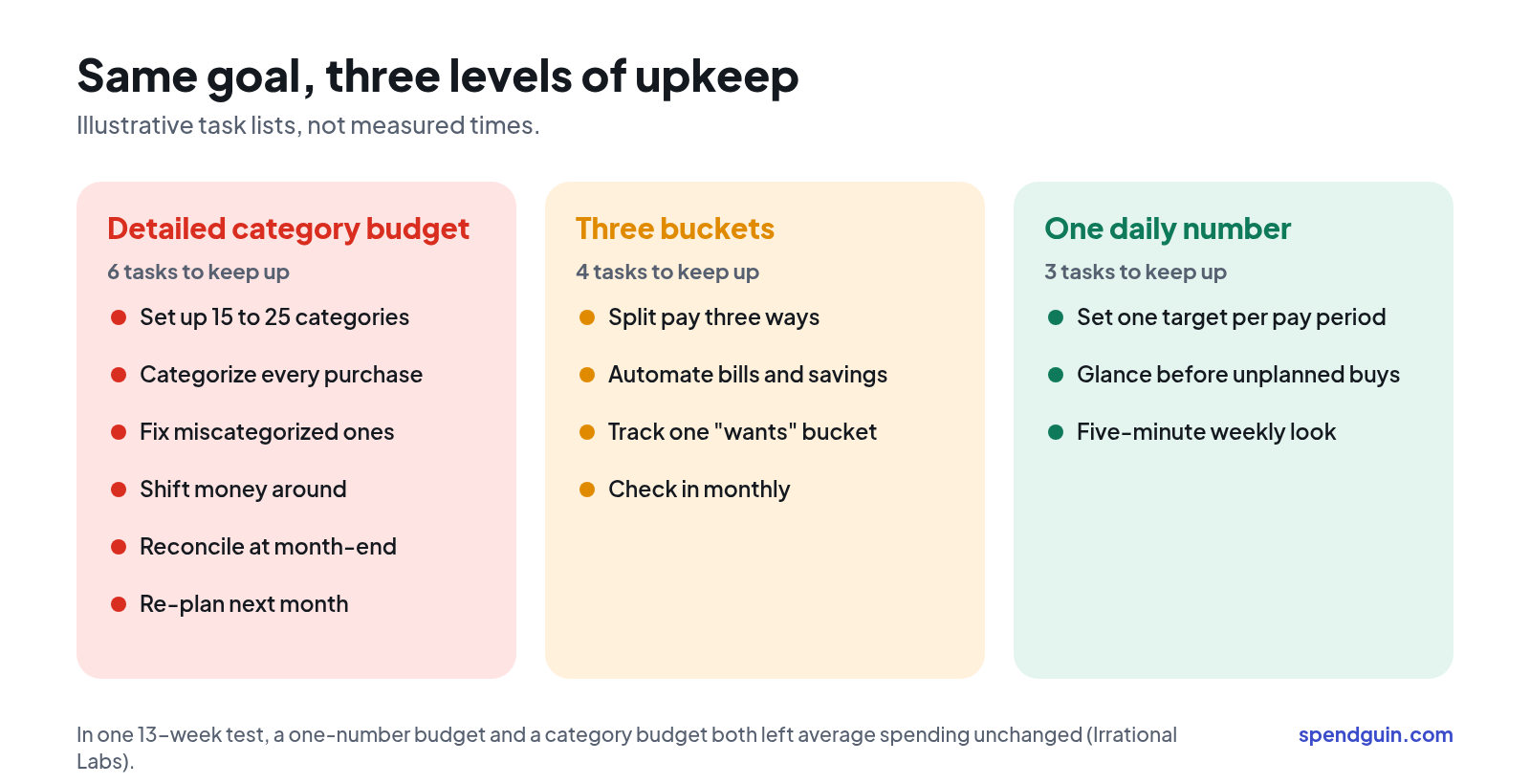 Figure 1. The same goal, three levels of upkeep. Illustrative task counts, not measured times.
Five ways to simplify your budget
1. Track one number instead of many categories
Take your flexible spending money for the pay period and divide it by the days in it. That gives you one number to check: what's left today. The daily spending limit guide walks through the arithmetic with an example.
2. Automate the fixed stuff
Bills and savings don't need daily decisions. Set them to pay or move automatically on payday, then budget only what's left. The best-known evidence on automatic saving is Save More Tomorrow, where enrollees' savings rates rose from 3.5% to 13.6% over 40 months; it wasn't randomized, and the US Department of Labor's CLEAR review rates the causal evidence as low (Thaler & Benartzi, 2004).
3. Use three broad buckets, not twenty
If you want some structure, use a few buckets. The 50/30/20 rule splits take-home pay into about 50% needs, 30% wants and 20% savings and debt (Warren & Tyagi, 2005). Your split may differ; the point is three decisions a month instead of dozens.
4. Capture spending without typing
Manual entry is the step people most often drop. Options that remove it: an app that links to your bank, or one that reads the purchase alerts your phone already shows. Each has trade-offs, covered in budget apps that don't need your bank login.
5. Swap the monthly reconciliation for a weekly look
Instead of an hour at month-end, take five minutes once a week: did the number hold, and is anything coming up? Monitoring helps goal attainment modestly (Harkin et al., 2016), and a short regular look is easier to keep than a long rare one. That last part is our suggestion, not a tested finding.
When to keep categories, and when to drop them
| Keep a category if... | Drop it if... |
|---|---|
| It answers a question you actually ask, such as "how much do we spend on groceries?" | You haven't updated it in weeks |
| You need it for taxes or a business | It exists because the app came with it |
| You're working a specific plan, such as paying down one card | Deciding where a purchase belongs takes longer than buying it |
| You're diagnosing one leak for a month or two | You only look at it at month-end, if at all |
A middle path many people find workable (our suggestion): one daily number for everything flexible, plus one or two categories you're actively watching.
Signs your budget is too complicated
- You dread opening it.
- You're behind on categorizing and catching up feels like a project.
- You check it after the month is over, not before you spend.
- You've restarted it more than once this year.
If two or more sound familiar, try a one-number budget for one pay period and see whether you keep looking at it. If a slip is what usually ends things, how to change your spending habits and the pillar guide, why budgets fail, explain why that happens.
Where Spendguin fits, and where it doesn't
Spendguin is deliberately simple: one target for the pay period, no categories to set up and no bank to link.
- You set one spending target for your pay period (monthly, twice a month, weekly, or every 2 weeks), and Spendguin turns it into a daily amount.
- It picks up purchases from your Google Wallet and bank-app notifications. There's nothing to type, and it never connects to your bank account (no bank login).
- Overspend today and it comes off the days after, within the same pay period. A new period starts fresh: leftover money doesn't roll into it.
- Free: the daily Today screen; alerts on every purchase, when you're getting close to today's amount and when you're over it; the "Recurring?" prompt; refund alerts; 30 days of history; and Together, partner sharing for two people.
- Pro ($4.99 a month or $39.99 a year in USD or CAD, after a 30-day free trial with no card needed, starting when the first purchase notification arrives): spreading a big purchase over several pay periods, a heads-up the day before a recurring charge, a nightly recap and a Monday week-ahead, a choice when a period ends over (spread the overspend across the new period or take it off day one), and full history. Pro features show as locked on Free.
What it doesn't do: it's Android only, it needs notification access, and it can only see what alerts show, so cash and anything without an alert has to be added by hand. It tracks spending you've already made. It doesn't move money or give financial advice. And it hasn't been tested in a controlled trial; we built it on ideas from behavior science, not proof that it changes behavior.
Sources
- Fogg, B. J. (2009). A behavior model for persuasive design. Proceedings of Persuasive '09, ACM. Accessed .
- Lush, M., Meagher, K., & Fontes, A. (2020). Personal financial management tools: Delivering on the promise of financial well-being? Consumer Interests Annual (survey of 1,059 US adults). Accessed .
- Epstein, D. A., et al. (2016). Beyond abandonment to next steps: Understanding and designing for life after personal informatics tool use. CHI 2016 (survey, n = 193). Accessed .
- Irrational Labs / Common Cents Lab. Budgeting: What our research uncovered. Field experiment with 9,035 budgeting-app users (industry report). Accessed .
- Iyengar, S. S., & Lepper, M. R. (2000). When choice is demotivating: Can one desire too much of a good thing? Journal of Personality and Social Psychology, 79(6), 995-1006. Accessed .
- Scheibehenne, B., Greifeneder, R., & Todd, P. M. (2010). Can there ever be too many options? A meta-analytic review of choice overload. Journal of Consumer Research, 37(3), 409-425. Accessed .
- Warren, E., & Tyagi, A. W. (2005). All Your Worth: The Ultimate Lifetime Money Plan. Free Press. Accessed .
- Thaler, R. H., & Benartzi, S. (2004). Save More Tomorrow: Using behavioral economics to increase employee saving. Journal of Political Economy, 112(S1), S164-S187. (Not randomized; rated low causal quality by the US Department of Labor CLEAR.) Accessed .
- Harkin, B., et al. (2016). Does monitoring goal progress promote goal attainment? A meta-analysis of the experimental evidence. Psychological Bulletin, 142(2), 198-229. Accessed .
FAQ
Why is budgeting so hard?
Mostly because of effort and timing, not math. Detailed budgets ask for many small tasks, such as categorizing, reconciling and re-planning, and surveys of people who stopped using finance apps point to that effort. The feedback also tends to arrive weeks after the spending, when nothing can change.
What is the easiest budgeting method?
There's no proven easiest method, but the lowest-effort options have few decisions: one daily spending number for the pay period, or three broad buckets such as needs, savings and free spending. Automating bills and savings removes more decisions.
Do I need budget categories?
Not to start. Categories help when you're tracking something specific, such as tax-deductible costs or a debt plan, or diagnosing one leak. If you've stopped updating them, a single number for flexible spending is a reasonable replacement.
Is the 50/30/20 rule simple enough?
It's simple to set up: about 50% of take-home pay to needs, 30% to wants and 20% to savings and debt, from Elizabeth Warren and Amelia Warren Tyagi's 2005 book All Your Worth. It doesn't tell you what you can spend today, so many people pair it with a daily or weekly number.
Does a more detailed budget work better?
Not in the one large test we know of. In a 13-week experiment with 9,035 budgeting-app users, a one-number weekly budget and a category budget both left average spending unchanged against a control group. Detail didn't beat simplicity there; neither changed much.
Spendguin shows what’s left to spend today by reading the purchase alerts you already get. No bank login.