The simple budget app: why fewer steps can beat more features
What makes a budget app simple, why effort is a documented reason people quit, what a simple app gives up, and how to choose one.
Part of the series that starts with Why budgets fail: the feedback delay problem.
Try it for free on Google Play
Spendguin is our product, so weigh our view accordingly. Spendguin is an Android budgeting app that shows what's left to spend today by reading purchase alerts from your bank and wallet apps. No bank login. This guide is about what to look for, whichever tool you pick. 🐧
It builds on why budgets fail: the feedback delay problem, which explains why fast feedback and low effort work together.
What "simple" can mean
People use the word for four different things. It helps to separate them:
- Setup. How many steps before you see a useful number?
- Capture. How do purchases get in: typing, a bank link, or alerts?
- Reading. Is there one number to act on, or a dashboard to interpret?
- Upkeep. What do you have to keep doing every week to keep it accurate?
A tool can be simple at setup and exhausting at upkeep, or the reverse. Judge all four.
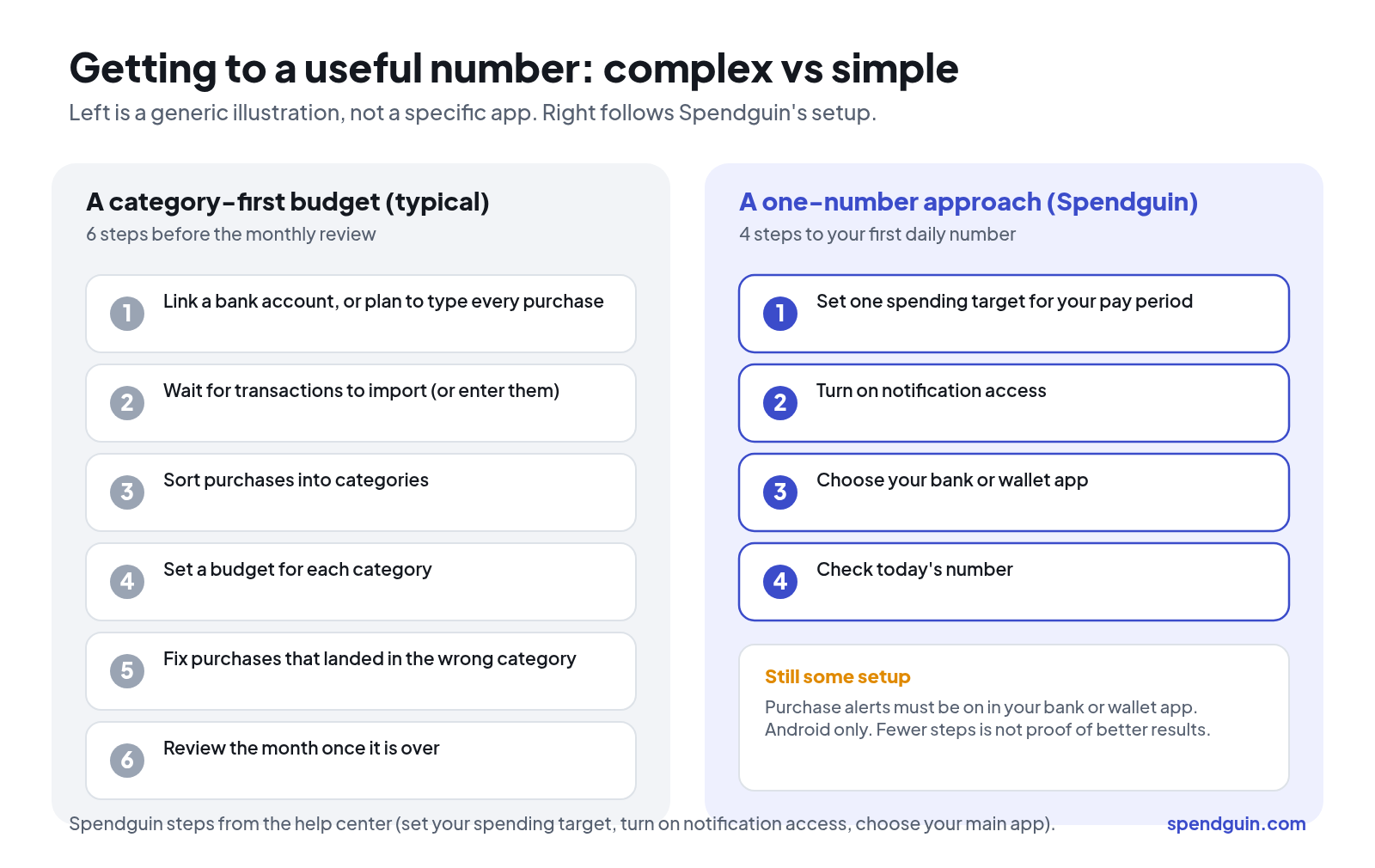 Figure 1. A generic category-first budget (left, illustrative, not a specific app) next to Spendguin's setup after you sign in and pick solo or shared (right, from the help center). Fewer steps is not proof of better results.
Why simplicity matters for habits
Ability is one of three ingredients. BJ Fogg's behavior model says a behavior happens when motivation, ability and a prompt come together. His 2009 paper names six elements of simplicity: time, money, physical effort, mental effort ("brain cycles"), social deviance and non-routine (Fogg, 2009). Every extra step in a budgeting routine costs some of those.
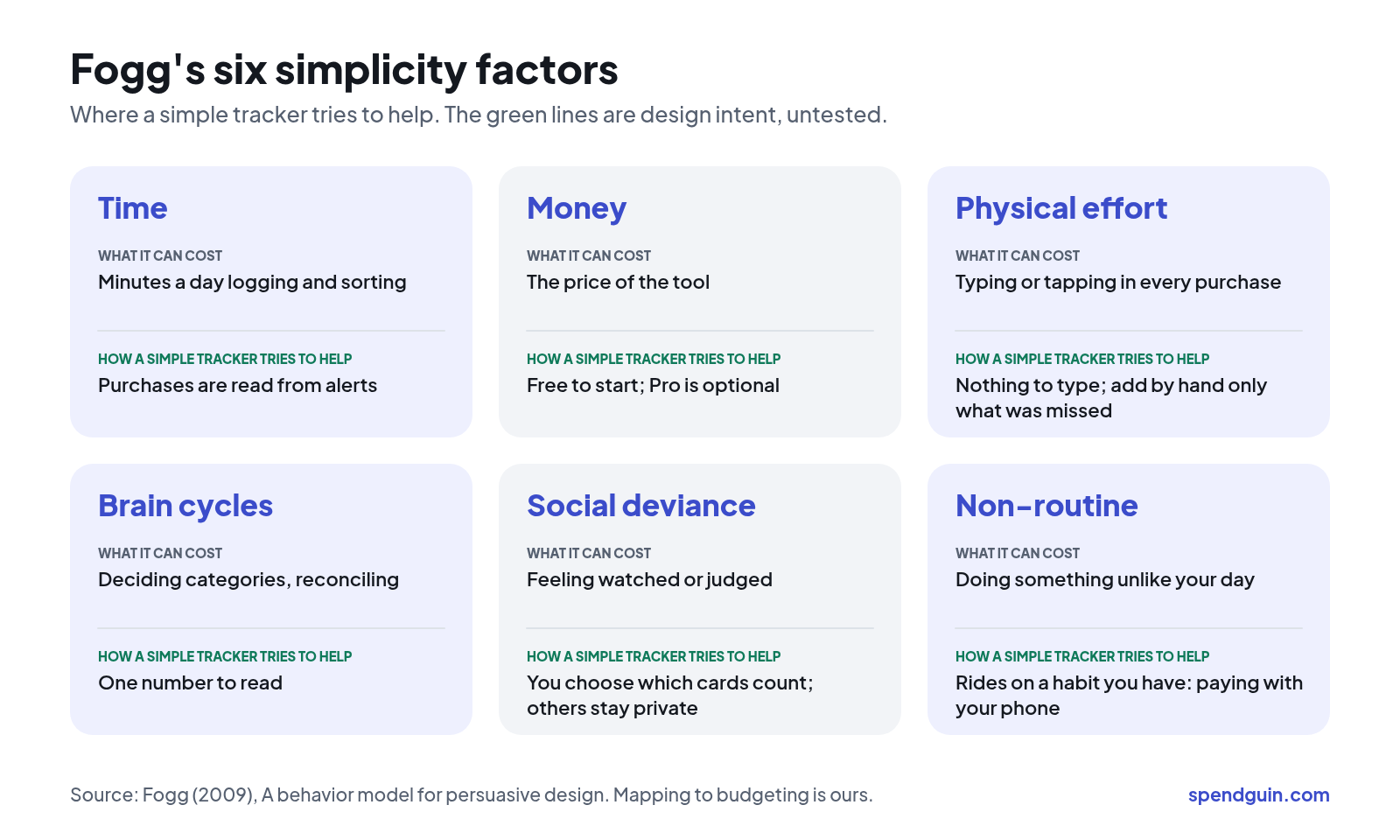 Figure 2. Fogg's six simplicity factors (2009). The green lines, how a simple tracker tries to lower each, are our design intent and are untested.
Friction shapes habits. Habit researcher Wendy Wood argues that how much friction a behavior has strongly shapes whether it's repeated, and that changing the environment often works better than relying on willpower (APA podcast interview; Wharton Magazine interview). Those are interviews summarizing her work, so we cite them as her stated view, not a single experiment.
Repetition is the point. Habit formation needs repetition; in one study the median time to near-peak automaticity was 66 days, with a range from 18 to 254 (Lally et al., 2010). A tool you quit in week two never gets there.
What the abandonment data shows
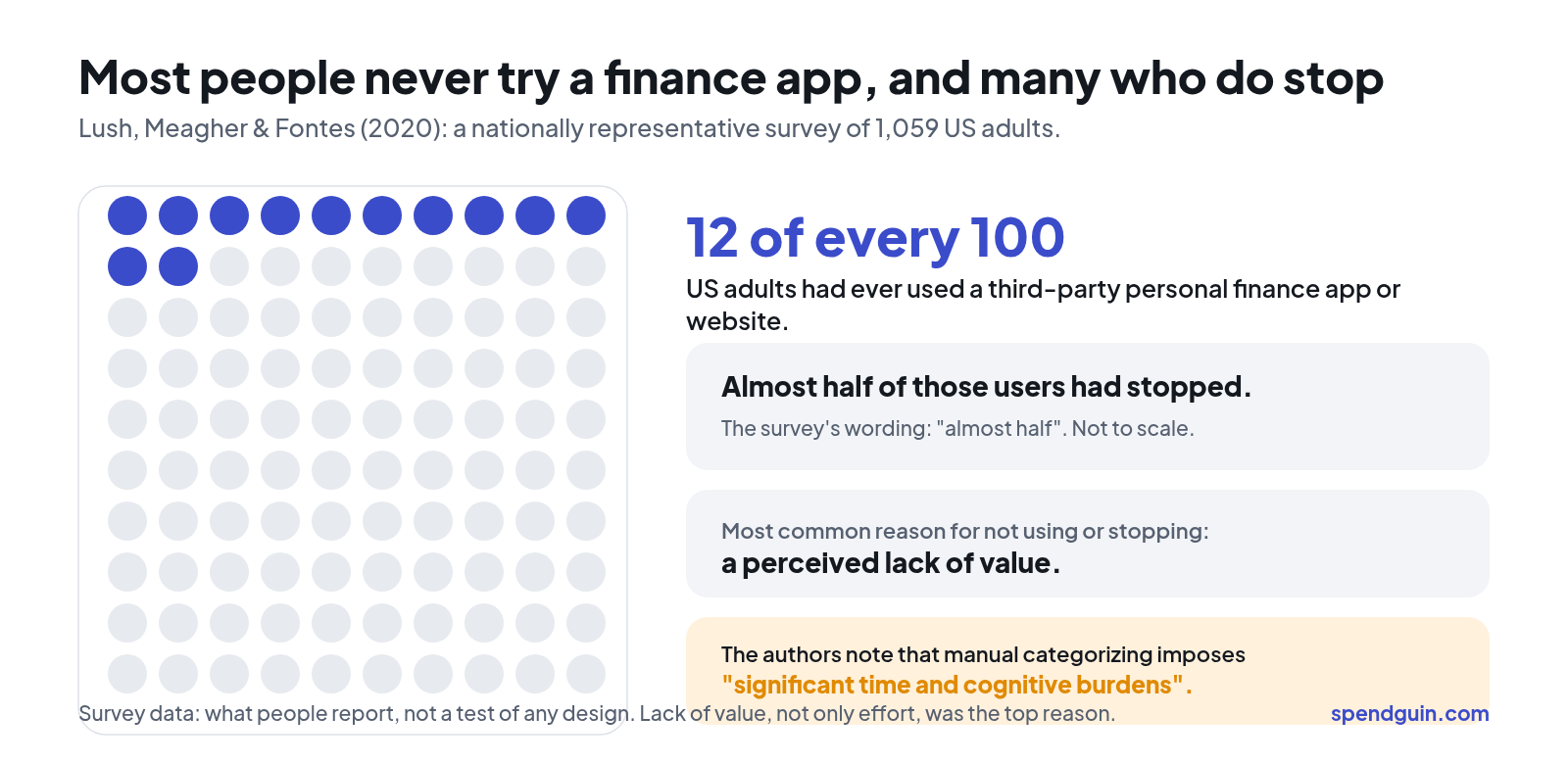 Figure 3. Lush, Meagher & Fontes (2020), a nationally representative survey of 1,059 US adults. "Almost half" is the survey's wording, so the chart does not draw an exact share.
- A national survey. Only 12% of US adults had ever used a third-party personal finance app or website, and almost half of those users had stopped. The most common reason for not using or stopping was a perceived lack of value. The authors also note that many apps require manual categorizing, which imposes "significant time and cognitive burdens" before people get any insight (Lush, Meagher & Fontes, 2020).
- Why people stopped tracking. In a survey of 193 people who had stopped tracking, the cost of tracking was a leading reason, and manual entry was a common thread. Some also found tracking uncomfortable: one said they "felt guilty every time I tracked an expense" (Epstein et al., 2016). Earlier work identified barriers at the data-collection stage as a major source of drop-off (Li, Dey & Forlizzi, 2010).
Caveats. These are surveys of what people say, not tests of a design change. The 2016 sample was small and online. And "lack of perceived value" means effort isn't the only reason people quit: a simple tool still has to feel worth opening.
What about "too many choices"?
You may have heard that fewer options is always better, usually through the jam study in which shoppers offered 24 jams bought less often than shoppers offered 6 (about 3% versus 30%) (Iyengar & Lepper, 2000). We'd rather not lean on it. A later meta-analysis of 50 experiments found the average effect of choice overload was close to zero (D = 0.02) and appeared only under certain conditions (Scheibehenne, Greifeneder & Todd, 2010). So we don't claim that fewer features always wins. The narrower claim is the one the abandonment research supports: effort is a documented reason people stop.
Does complicated work better? Not in the one big test
Irrational Labs ran a 13-week experiment with 9,035 budgeting-app users. Neither a single weekly "one number" budget nor a category budget changed average spending versus a control group ($681 and $673 versus $676, no significant differences), and 84% of users viewed their budget five times or fewer (Irrational Labs). So in that test the more detailed option was no better, and engagement was the weak point for both. It doesn't show simple wins. It does show that setting a budget and rarely looking at it does little.
Four kinds of "simple" budget app, compared
Apps that call themselves simple tend to simplify different things:
| Kind | What it simplifies | What it still asks of you | Typical trade-off |
|---|---|---|---|
| Envelope / manual entry (for example Goodbudget) | Gives money a bucket; no bank connection needed to start | Assigning money to envelopes and entering spending | Setup and upkeep; shared household envelopes are a plus |
| Bank-synced "what's left" snapshot | Pulls transactions in for you | Linking accounts, then reviewing or fixing categories | Bank credentials through an aggregator, and sync that can lag (Plaid docs) |
| Offline logger (for example Simple Budget, which describes itself as private and offline) | Keeps data on the device; minimal screens | Logging each expense yourself | Manual entry |
| Alert-reading daily number | One number from your pay period target; picks up purchase alerts | Granting notification access and setting a target | Android only; it only sees what alerts show |
Examples are drawn from each product's own site and are not reviews; features and prices change, so check before you choose. We found no study comparing which kind people keep using longest. The abandonment surveys above cover finance-app users in general, so the useful test is the one in the checklist below: how soon do you get a number, and how long do you keep opening it?
What a simple app gives up
Honesty about trade-offs is part of choosing well. A simple, one-number tool usually won't give you:
- Detailed category analysis. If you want to know exactly where money goes by category, you'll want something fuller.
- Net worth, investments or full financial planning.
- Complete history of everything. In Spendguin, for example, Free shows the last 30 days and older history is Pro.
- A guarantee of capture. A tool that reads alerts only sees what alerts show (more below).
Some people use a simple tool for the daily habit and a spreadsheet or a fuller app once a month for the big picture. That split is our suggestion, not a research finding.
Seven things to look for in a simple budget app
-
A short path to a first useful number. Count the steps.
-
One number you can act on, not just a report.
- Automatic or near-automatic capture, with a quick way to add what it misses.
- No required upkeep, such as reconciling or re-sorting.
- Honest limits. Does it tell you what it can't see?
- A privacy story you understand. What leaves your phone?
- A kind tone. Numbers that feel like scolding get avoided (Epstein et al., 2016).
Five ways to simplify any budget
-
Pick one number. Take your monthly spending money and divide by the days in the pay period.
-
Drop the categories for a month. You can add them back later if you miss them.
- Automate capture where you can, and keep manual entry to amount only.
- Check it before you spend, not after.
- Give it two months before judging it (Lally et al., 2010).
For the full method, see how to stick to a budget. For the method in more depth, including when categories are worth keeping, see budgeting feels too complicated.
Where Spendguin fits, and where it doesn't
Spendguin's setup, per the help center, is: sign in with Google, say whether it's just you or shared, then set one spending target for your pay period (monthly, twice a month, weekly, or every 2 weeks), turn on notification access, choose your bank or wallet app, then check today's number (set your spending target; notification access). It never connects to your bank account and never asks for a bank username or password (no bank login).
It's not zero setup: purchase alerts have to be on in your bank or wallet app, and it's Android only. It can only see what alerts show; anything missed can be added by hand. Alerts on every purchase, when you're getting close to today's amount, and when you're over it are free. Partner sharing is free. Pro is a paid subscription after a trial, and adds spreading big purchases over pay periods, a day-before heads-up on recurring charges, a nightly recap and Monday week-ahead, choices for what to do with an overspend when a pay period ends (spread it or carry it to the first day), and older history (Free shows the last 30 days). Pro features show as locked on Free. It tracks spending you've already made, and it doesn't move money or give financial advice. It hasn't been tested in a controlled trial.
Keep reading: how real-time feedback fits in (the real-time spending tracker guide), and what to do on the day you overspend (how to stick to a budget).
Sources
- Fogg, B. J. (2009). A behavior model for persuasive design. Persuasive '09, ACM. Accessed .
- Wood, W. Interview: How the science of habits can help us keep our New Year's resolutions. American Psychological Association podcast (secondary source). Accessed .
- Wharton Magazine. How to form good habits (and break bad ones), interview with Wendy Wood (secondary source). Accessed .
- Lush, M., Meagher, K., & Fontes, A. (2020). Personal financial management tools: Delivering on the promise of convenient financial well-being? Consumer Interests Annual, 66 (survey, n = 1,059). Accessed .
- Epstein, D. A., et al. (2016). Beyond abandonment to next steps: Understanding and designing for life after personal informatics tool use. CHI 2016 (survey n = 193). Accessed .
- Li, I., Dey, A., & Forlizzi, J. (2010). A stage-based model of personal informatics systems. CHI 2010. Accessed .
- Iyengar, S. S., & Lepper, M. R. (2000). When choice is demotivating. Journal of Personality and Social Psychology, 79(6), 995-1006. Accessed .
- Scheibehenne, B., Greifeneder, R., & Todd, P. M. (2010). Can there ever be too many options? A meta-analytic review of choice overload. Journal of Consumer Research, 37(3), 409-425. Accessed .
- Irrational Labs. Budgeting: What our research uncovered (13-week experiment, N = 9,035). Accessed .
- Harkin, B., et al. (2016). Does monitoring goal progress promote goal attainment? A meta-analysis. Psychological Bulletin, 142(2), 198-229. Accessed .
- Lally, P., et al. (2010). How are habits formed: Modelling habit formation in the real world. European Journal of Social Psychology, 40(6), 998-1009. Accessed .
- Spendguin help center: Set your spending target; Turn on notification access; No bank login. Accessed .
- J.P. Morgan Chase Institute (2015). Weathering Volatility: Big data on the financial ups and downs of U.S. individuals (Farrell & Greig). Accessed .
- Plaid developer documentation. Transactions webhooks (update frequency) and Transaction states (pending vs posted). Vendor documentation, not independent testing. Accessed .
FAQ
What is the simplest way to budget?
Pick one number you can check every day, such as what is left to spend today, and make capturing purchases as automatic as you can. A spreadsheet, a notebook or a simple app can all do it. What matters is that you keep doing it.
Is a simple budget app enough?
For building the habit of checking your spending, often yes. It will not give you category reports, net worth tracking or detailed history, so if you need those, a fuller tool fits better. Many people use a simple tool for the daily habit and look at the detail separately.
Do simple budget apps work better?
Nobody has shown that directly. What research shows is that effort and complexity are common reasons people stop using finance tools, and that habits need repetition. Simple is easier to keep using, but better financial outcomes from simplicity alone are untested.
Why do people quit budgeting apps?
In a survey of 1,059 US adults, nearly half of finance-app users had stopped, with perceived lack of value the most common reason and manual categorizing named as a burden. Smaller studies point to the hassle of tracking and to discomfort when tracking makes you feel bad.
Does a simple budget app need my bank login?
Not necessarily. Spendguin reads the purchase alerts your phone already shows, so it never asks for a bank username or password and never connects to your bank account. It does need notification access on Android.
What is the simplest budgeting app to use?
There is no independent ranking, so judge by a short test: how many steps from install to a first useful number, whether it needs bank linking or category setup, and whether you will still open it in week three. Envelope apps, bank-synced snapshot apps, offline loggers and alert-reading daily-number apps all call themselves simple and trade different things. Spendguin is built to be the last kind, on Android only.
Do I need bank sync for a budget app?
No. Bank sync saves typing, but it needs your bank credentials to go through an aggregator and can lag: Plaid, one major aggregator, documents checking for new transactions one to four times a day. Alternatives are manual entry or apps that read purchase alerts on your phone, each with their own trade-offs. Our guide to budget apps that don't need your bank login compares the options.
How do I budget if I am paid every two weeks?
A monthly budget does not line up with biweekly pay: some months have three paychecks, and the J.P. Morgan Chase Institute lists months with five paydays as one driver of monthly income swings. Budget per pay period instead. Spendguin takes one spending target for your pay period — monthly, twice a month, weekly, or every 2 weeks — and turns it into a daily amount.
Spendguin shows what’s left to spend today by reading the purchase alerts you already get. No bank login.